GMGN Trenches and Sniper Bot: Trading New Launches
Table of Contents
- The Trenches Feed
- Hotkey buying
- NEW PAIR and TRENDING
- What Does GMGN's Security Panel Check?
- Insiders, snipers and the first 70 buyers
- The Sniper Bot
- Auto buy
- Migrated Snipe
- Dev Sell and Migrated Sell
- Auto sell, TP/SL and trailing exits
- What Does a Snipe Cost in Total?
- Why Does a New-Launch Trade Fail on GMGN?
- Before You Snipe Anything
Trenches is GMGN's front page and its most honest surface: three live columns of tokens that are new, close to bonding, or freshly migrated, refreshing faster than you can read them. It is built for the trade where the whole decision window is a few seconds, and everything else on the platform, the audits, the hotkeys, the auto-buy filters, exists to make that window survivable.
This guide covers what the sniping stack actually does, what it costs, and the specific ways a new-launch trade fails on GMGN. Its discovery data is genuinely good. The execution settings are where people lose money, and they are almost all defaults nobody changed.
GMGN's fee documentation describes no extra charge for sniping. It pays the same flat 1% per transaction as a manual trade, and pointing the bot at a custom RPC does not change that either. The settings that decide the outcome are slippage, which GMGN recommends at 50% or more on new tokens, and the on-chain fee, which it recommends at 0.006 SOL or higher for automated orders. Anti-MEV will not engage below a 0.002 SOL priority fee. And GMGN's own documentation offers no configuration that gets you past error B4, where the sell is blocked because the token is a honeypot or your wallet is blacklisted by its deployer.
The Trenches Feed
Open https://gmgn.ai and the default view is Trenches, split into three columns by lifecycle stage:
- New. Tokens that have just launched on a supported launchpad. GMGN continuously scans Pump.fun, letsbonk, Raydium and Four.meme, so which launchpads populate the column depends on the chain you have selected. GMGN's own documentation names Pump, Moonshot and Raydium as the launchpad filters on the NEW PAIR page, read 1 September 2026. letsbonk and Four.meme are read off the live terminal rather than the docs, so treat that pair as an observation.
- Almost bonded. Tokens approaching the bonding curve threshold that graduates them to a real DEX pool. This is where migration snipes get set up.
- Migrated. Tokens that have completed migration and now trade against a DEX pool.
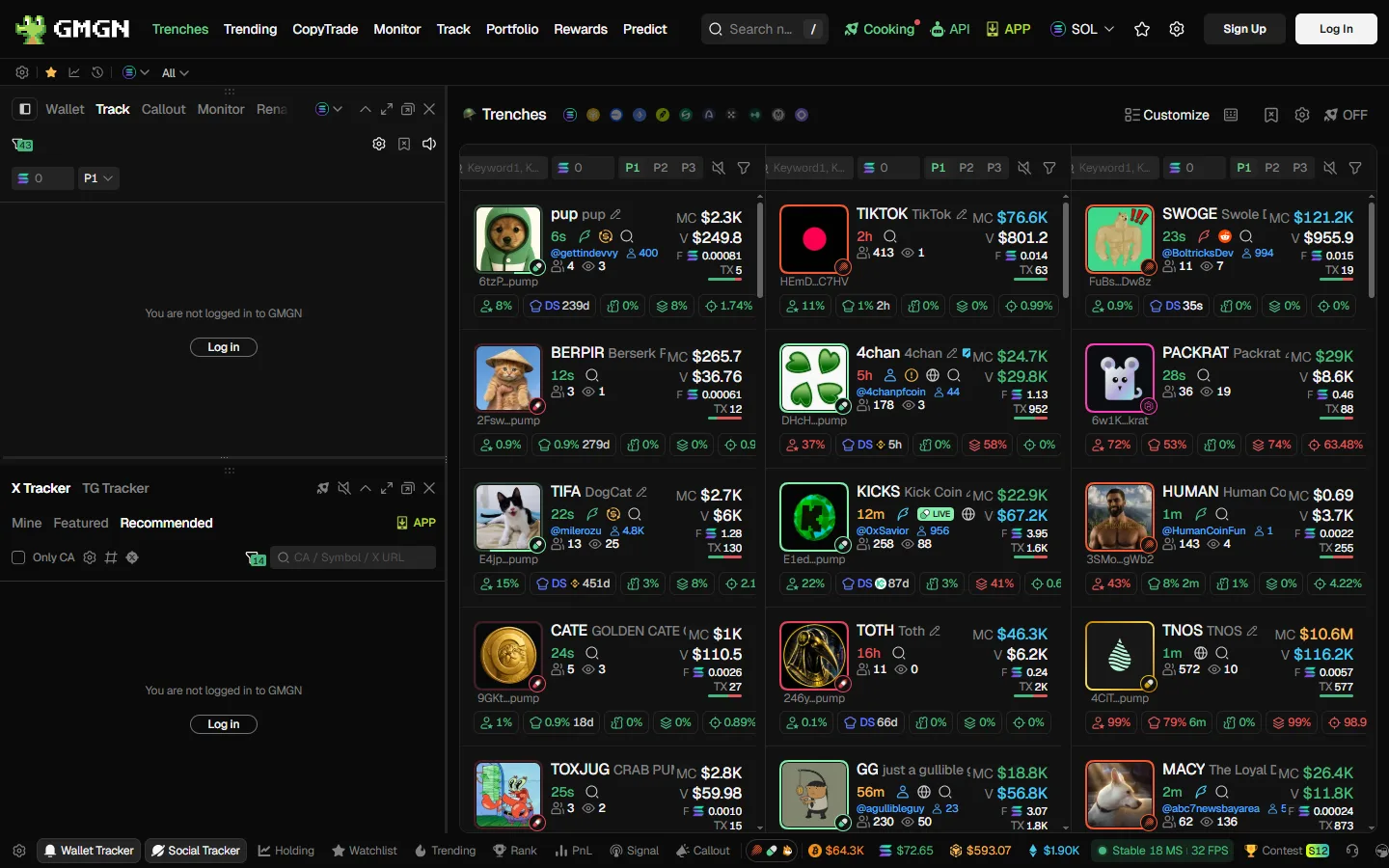
The chain selector in the top right changes all three columns completely. GMGN is no longer a Solana-first product by volume, and the BSC feed behaves differently from the Solana one, a shift covered in what is GMGN.
Hotkey buying
Trenches has a keyboard buying layer, enabled from the keyboard icon in the feed. The icon turns green when it is armed. Two modes, per GMGN's hotkey documentation, read 6 August 2026:
| Mode | Sequence | Suits |
|---|---|---|
| Simple (Mode A) | Hover a column, hold the auxiliary key (Z by default), press the row key | Mouse to target, keyboard to fire. Turns on pause-on-hover automatically |
| Combo (Mode B) | Hold the pause key (Space by default), hold a column key, press the row key | Keyboard only, no mouse in the loop at all |
In both modes, holding the modifier paints large number watermarks across the token cards in the target column so you can hit the right row without reading tickers. Three supporting features matter more than they sound:
- Pause live feed on hover freezes a column while your cursor is in it, so the row you are aiming at does not scroll away mid-keystroke.
- X Preview (
Xby default) pops the token's X account without leaving the feed. - Web Preview (
Vby default) opens the token's site, and if the token links a YouTube, TikTok or Instagram URL, the popup parses and plays the video.
Warning
Hotkeys buy at your preset amount with your saved slippage and fee settings, with no confirmation dialog. Check those presets before you arm the feature, not after. A keyboard layer over a feed of brand-new tokens is exactly as dangerous as it sounds.
NEW PAIR and TRENDING
Trenches is the firehose. The two table views are for filtering it.
NEW PAIR lists pools from one minute to 24 hours old, filterable by launchpad (Pump, Moonshot, Raydium). Every column named below is defined in GMGN's NEW PAIR documentation, read 1 September 2026. Its columns are Age, Liq/Initial, MC, Holders, 1h TXs, 1h Vol, Price, the 1m/5m/1h percentage moves, and a Degen Audit column that carries the security summary. The dashboard also shows DEXScreener cost, which is what the project has spent on DEX Screener updates, images and boosts. That figure is a useful signal in both directions: real spend means someone is committing money to the launch, and it also means marketing money is going out rather than into liquidity.
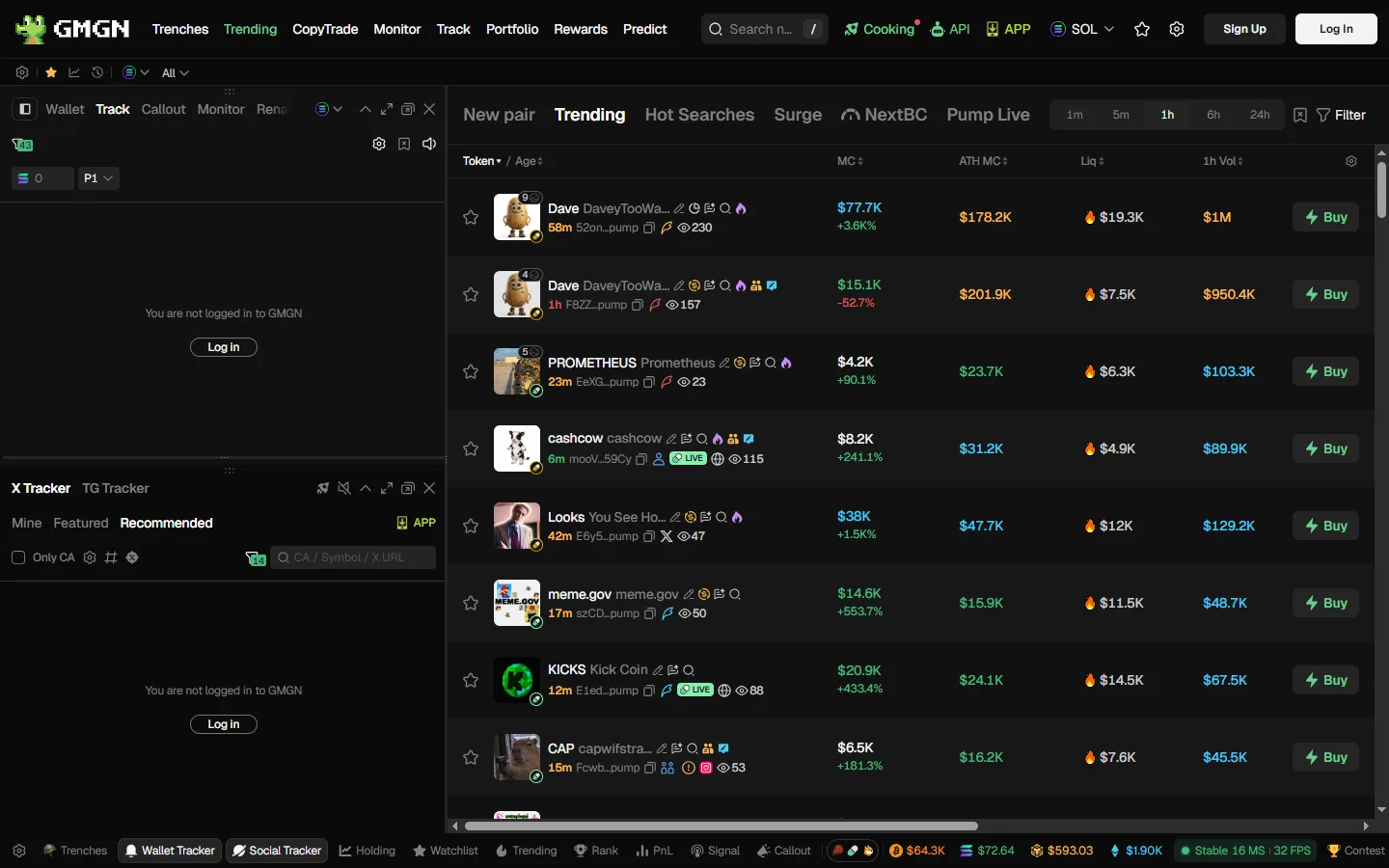
TRENDING ranks the most traded tokens over 1 minute, 5 minute, 30 minute and 1 hour windows, with the same filter and sort machinery, per GMGN's TRENDING documentation, read 1 September 2026. Its distinctive column is NextBC, the blue chip index: the share of a token's holders who also hold established tokens on that chain. GMGN's logic is that a high blue chip index means experienced holders are accumulating. Treat it as one input rather than a verdict, since a bundled launch can manufacture that profile.
Both pages carry CTO flags for community takeovers, DEX Screener ad and update indicators, and a star to add a token to your watchlist.
What Does GMGN's Security Panel Check?
This is the part that separates a snipe from a donation. Every token page carries GMGN's CA security checks, and they take about ten seconds to read once you know the fields. What each field actually screens for, and what it cannot catch, is broken down field by field on our security hub, per GMGN's CA security checks documentation, read 6 August 2026.
| Check | Chain | What you want to see |
|---|---|---|
| MintDisable | Solana | Yes. The creator cannot mint more supply into the market |
| Top10 hold | Solana | Yes, meaning the top 10 holders control under 30% of supply |
| Blacklist | Solana | No. Yes means the developer can freeze your wallet out of selling |
| Burnt | Solana | As high as possible. 100% means liquidity cannot be pulled |
| Rug probability | Solana | Low. Derived from how often this token's holders buy rug tokens |
| Rug History | Solana | Empty. Lists other rugs launched by the same creator |
| Honeypot | ETH, Base, BSC | No. Sourced from GoPlus, and GMGN warns its display can lag |
| Verified | ETH, Base, BSC | Yes. Contract source is open on Etherscan |
| Renounced | ETH, Base, BSC | Yes, with a caveat: fake renouncements that still update code exist |
| Locked / Burned | ETH, Base, BSC | Locked or burned LP. Burned is irreversible, locked expires |
| Buy / Sell Tax | ETH, Base, BSC | Low. GMGN's own example of a honeypot in disguise is a 99% sell tax |
Rug History is the highest-value single field here, because it is the only one describing the human rather than the contract. A creator with prior rugs attached to the wallet is a repeatable pattern, and no amount of clean contract configuration changes that.
Insiders, snipers and the first 70 buyers
Below the chart, GMGN classifies the early wallet set, per its insider, sniper and first-70-buyers documentation, read 6 August 2026. Every label in this section, plus the five holding statuses GMGN attaches to each wallet, is defined in the GMGN glossary:
- Insider traders are wallets that hold the token but never bought it after trading opened. GMGN's read is that this often means creator supply distributed across wallets for a quiet sell later. The insider holding ratio, as a share of total supply, is the number to watch, and higher is worse. Legitimate airdrops produce the same fingerprint, so check the project's X account before assuming.
- Snipers bought within the first few blocks after open.
- Scammer wallets carry a GMGN label applied to addresses that frequently buy rug tokens. GMGN's docs describe them as suspected secondary accounts of rug creators, which is GMGN's characterization of an anonymous address rather than a finding about any identified person.
- First 70 buyers get a status each: Hold, Buy More, Sell Part, Sell All, or Transferred. On Solana, GMGN notes it cannot reliably distinguish a transfer from a sell, which is why Transferred exists as its own label.
The aggregate stats matter more than any individual row. Total Bought is what the first 70 took as a share of supply. Current Total Holdings is what they still have. A large gap between the two, minutes after launch, is the early cohort already distributing into your buy.
Info
GMGN disclaims all of it. Every security page carries the same line: reference only, third-party data, no guarantee of accuracy or timeliness. A clean panel means the obvious traps have not been detected yet. It is not an audit.
Run the Trenches With the Audit Open
GMGN's security panel, insider and sniper labels and first-70-buyer breakdown sit on the same screen as the buy button, at a flat 1% per transaction. Our link applies referral code ggguide, which pays us a share of GMGN's fee and costs you nothing extra.
Open GMGNThe Sniper Bot
The Telegram sniper bot is the same execution engine in a chat window. GMGN runs five parallel Solana instances (@GMGN_sol_bot, @GMGN_sol02_bot, @GMGN_sol03_bot, @GMGN_sol04_bot and @US_GMGNBOT) and tells you to switch to a backup if responses slow down. Those five handles are the ones on GMGN's published Telegram bot list, read 1 September 2026, which is the list to check a handle against. Its menu covers Buy/Sell, Limit orders, Assets, Wallet, Copy Signal for Pump CTO signals, Copy Trade, Pump FOMO, New LP, Featured Signals, Track SM Wallet, Invitation Rebate and Settings.
Warning
Verify the handle character by character. GMGN's own documentation warns that scammers register lookalike bots using a capital "I" disguised as a lowercase "l", and tells users to treat any handle outside its published list as unsafe. GMGN also lists third-party Telegram language packs as a compromise vector, so do not install one.
Auto buy
Turn on auto buy in Settings and the bot buys any contract address you paste in, immediately, at your preset size. Two filters gate it, per GMGN's auto buy documentation, read 6 August 2026:
- Min Liq. Set 1000 and the bot only fires when the pool is above $1,000.
- Max MC. Set 250000 and it only fires below a $250,000 market cap.
Those two numbers are the difference between an auto-buy setup and a random contract-address executor. Paste a CA from a Telegram group with no filters set and you have delegated your judgement to whoever posted it.
Migrated Snipe
This is the flagship sniping feature and it has strict rules, per GMGN's Migrated Snipe documentation, read 6 August 2026:
Find an ungraduated token
Any Solana token that has not yet had official DEX liquidity added is eligible. The Almost bonded column in Trenches is the natural hunting ground.
Open Auto Trading on the token page
Select Migrated Snipe. In the Telegram bot, paste an ungraduated contract address and the Snipe Raydium option appears with its own SOL amount.
Set the full order, not just the size
Buy amount, take-profit including trailing take-profit, stop-loss including trailing stop-loss, then slippage, priority fee and Anti-MEV. Save.
Arm it before migration
The task must exist before the DEX adds the official pool. One task per token, and it cannot be created afterward.
Manage it from the web
Token page, Orders tab. The Telegram bot can create and adjust snipe tasks but cannot list them, so the web dashboard is the only place to view or delete.
Dev Sell and Migrated Sell
Two automatic exits worth arming on a launch trade. Dev Sell closes your position when the token creator sells at or above a ratio you configure in a single transaction. Migrated Sell dumps a percentage of your holdings the moment the token migrates, which is the standard play if your thesis was the migration pop rather than the token.
Auto sell, TP/SL and trailing exits
Exits are configured per buy, and this is the single most common source of confusion on the platform.
- Take-profit and stop-loss orders can be stacked as multiple presets per buy. The ones the bot creates automatically carry a 24 hour validity period, per GMGN's auto sell documentation, read 1 September 2026; a limit sell you place by hand offers 1 hour, 24 hours or 3 days.
- Trailing take-profit arms at your take-profit price, then follows the price up and sells on a drawdown percentage. GMGN's suggested pairings are TP +50% with a 10% drawdown, TP +100% with 15%, TP +200% with 20%. Its own worked example runs an entry at $140 with a 20% TP and a 5% trail, and closes at $180.50 for a 28.9% gain. All four figures come from GMGN's trailing take-profit documentation, read 1 September 2026.
- Trailing stop-loss has no activation price. It starts working immediately and the stop only ratchets upward, per GMGN's trailing stop-loss documentation, read 1 September 2026.
Warning
Auto-sell is calculated per purchase, not per position. Buy the same token three times and you get three overlapping sets of TP/SL orders that fire independently. GMGN's auto sell documentation, read 1 September 2026, tells you to manually close the earlier order sets when you add to a position. There is also a hard cap of 100 active limit orders per account, which returns error order10008, listed in GMGN's transaction and limit order failure documentation and read the same day.
What Does a Snipe Cost in Total?
One number: 1% per transaction, on the buy and again on the sell. GMGN's fee page states that it charges "a 1% handling fee for a single transaction, and there are no additional charges." That page documents no sniper surcharge, no subscription and no premium tier, re-checked 1 September 2026. Guides quoting a separate sniping fee are not citing GMGN's published schedule, and the full sector comparison is in GMGN fees explained.
Everything else on the bill is network cost you control. GMGN's formula, on the same fee page re-read 1 September 2026, is on-chain fee equals priority fee plus tip fee plus gas. Both the priority fee and the tip run from a minimum of 0.0001 SOL to a maximum of 2 SOL, and GMGN collects neither.
| Situation | Slippage | Total on-chain fee |
|---|---|---|
| Manual buy or sell, speed not critical | Auto | 0.002 to 0.005 SOL |
| Auto buy, auto sell, limit and snipe orders | 30% to 35% | 0.006 SOL or higher |
| New or hot tokens | 50% or more | 0.006 SOL or higher |
| Anti-MEV enabled | Anti-MEV slippage setting | Priority fee of at least 0.002 SOL, tip at least 0.0001 SOL |
Anti-MEV runs in three RPC modes: off protection (all nodes, fastest), reduced protection (limited nodes, still front-runnable), and secure protection (safe nodes, slightly slower, with compensation). The tradeoff is real on a snipe, where the sandwich risk is highest and so is the cost of being a block late.
On a new launch, the 1% is the smallest number in your cost stack. A snipe at 50% slippage on a token minutes old will routinely give up more to the fill than to GMGN, and a failed on-chain execution (error C1) burns the gas and priority fee anyway. Size the priority fee to the trade, not to the urgency you feel.
Why Does a New-Launch Trade Fail on GMGN?
GMGN publishes a full error taxonomy, which is unusual and worth using. Every code below is quoted from GMGN's transaction and limit order failure documentation, read 1 September 2026. The ones that hit snipers:
- B4. The sell is blocked. The token is a honeypot, which GMGN calls a Pixiu, or the token's deployer has blacklisted your wallet. GMGN's documented answer offers no workaround: once either is confirmed, the position cannot be sold. This is what the Blacklist and Honeypot fields in the security panel are for.
- B3. The buy is restricted by the token itself.
- D2. The token is inside the migration window between the launchpad and the DEX pool, so no route exists. It is temporary and waiting is the only option.
- D1. The creator pulled liquidity. There is no route because there is no pool.
- C1. Slippage too low for how fast the price moved, failing on-chain and burning gas and priority fee with it.
- A1. Priority fee too low, so the transaction timed out without being packed. Note a timed-out transaction may still have landed, so check the chain before retrying and buying twice.
Full diagnostics for every code, including the raw strings people paste into search, are in GMGN transaction failed.
One Solana quirk to know in advance: a sell can settle in WSOL rather than SOL. The Solana bot has a one-click WSOL to SOL converter under Wallet.
Before You Snipe Anything
The wallet you are sniping from is a GMGN-generated hot wallet. GMGN's TG wallet documentation, read 1 September 2026, states that private key export is prohibited on every chain it supports, including wallets you imported yourself, and that funds leave through GMGN's withdrawal flow, which requires Google Authenticator 2FA and a whitelisted address, with a 3 hour lock after first whitelist setup or any whitelist change and a 24 hour hold after re-binding Google Authenticator. Whatever the thinking behind it, the effect on you is the same: your exit runs on GMGN's timetable, not yours. We work through it in is GMGN safe and who holds your keys. Deposit mechanics and the multi-wallet system are in connect Telegram and fund your GMGN wallet.
Keep 0.05 SOL in reserve, the amount GMGN's error B1 entry recommends for a Solana wallet in its failure documentation, read 1 September 2026, or B1 will start eating your snipes for insufficient balance.
If you are new to the platform, work through how to trade on GMGN first, since the settings panel does more damage than any feature on this page. If you want automation without hunting launches yourself, GMGN copy trading mirrors a wallet instead, with its own fee arithmetic to watch. And for how GMGN's sniping stack compares to the browser-terminal alternative, see GMGN vs Photon, or GMGN vs Banana Gun for a Telegram-first sniper that also documents EVM launches.
Nothing here is financial advice. Tokens sniped at launch go to zero as a matter of routine, and the tooling that makes them fast to buy makes them equally fast to buy badly.
Cite this page
These figures are free to quote. Copy the citation or the link below.
Plain-text citation
GMGNGuide. "GMGN Trenches and Sniper Bot: Trading New Launches." Published August 6, 2026, updated August 6, 2026. https://gmgnguide.com/guides/trading/gmgn-trenches-sniperHTML link
<a href="https://gmgnguide.com/guides/trading/gmgn-trenches-sniper">GMGN Trenches and Sniper Bot: Trading New Launches — GMGNGuide</a>Embed the sniping settings table
The attribution line is part of the snippet. Please keep it.
Methodology and reuse
Every rate on this page is read from GMGN's own documentation: the flat 1% handling fee per transaction with no additional charges, the on-chain formula of priority fee plus tip fee plus gas, the 0.0001 SOL minimum and 2 SOL maximum on each of those, the recommended 0.002 to 0.005 SOL total for unhurried trades and 0.006 SOL or more for automated orders, the 0.002 SOL priority-fee floor for Anti-MEV, and the slippage guidance of 30 to 35% for automated orders and 50% or more for new tokens. The hotkey sequences, security-panel fields, error codes, order limits and trailing-exit examples elsewhere on the page each link the GMGN documentation page they came from, with the date it was read. Nothing here is our own measurement or estimate. They were read from the official GMGN fees and settings documentation on and re-verified against the live app. Exchanges change their schedules, so treat any figure older than that date as needing a fresh check — the date above is the one to compare against.
You may republish these figures with attribution and a link to https://gmgnguide.com/guides/trading/gmgn-trenches-sniper.
Start Sniping With the Settings Set Properly
Hotkey buying, migration snipes, auto sell and trailing take-profit, all at the same flat 1% GMGN charges on a manual trade. Signing up through our link applies referral code ggguide, which earns us a share of the fee you would pay regardless.
Trade on GMGNFrequently Asked Questions
No. GMGN's fee documentation describes exactly one platform fee: 1% per transaction, charged on the buy and again on the sell, with no additional charges. Sniping, auto buy, migration snipes and copy trading all pay that same 1%. What varies is the priority fee and tip you set yourself, and those go to validators and private nodes rather than to GMGN.
Two modes. Simple mode is mouse plus keyboard: hover a column, hold the auxiliary key (Z by default), then press the row key to buy. Combo mode is keyboard only: hold the pause key (Space by default), hold a column key for New, Almost bonded or Migrated, then press the row key. Both light up large number watermarks on the token cards so you can target the right row. X previews the token's X account and V opens a web preview that auto-plays a linked YouTube, TikTok or Instagram video.
The most likely answer is error B4: the sell was blocked because the token is a honeypot, known in GMGN's documentation as a Pixiu, or because the token's deployer has blacklisted your wallet. GMGN's documented answer is that once either is confirmed, the position cannot be sold, and it offers no workaround. Neither cause sits on GMGN's side or yours; both are properties of the token contract. GMGN's Solana security panel shows whether a blacklist function exists, and on EVM chains the honeypot flag and sell tax come from GoPlus data. A 99% sell tax is a honeypot in all but name.
You create the task on an ungraduated Solana token before the DEX adds official liquidity, setting buy amount, take-profit, stop-loss, slippage, priority fee and Anti-MEV. When the pool opens, the order fires automatically. One task per token, and it cannot be created after the DEX pool exists. The Telegram bot can create and adjust these tasks but cannot list them, so you have to view and delete them from the web auto-trading dashboard.
GMGN recommends 50% or more slippage on new and hot tokens, and 30 to 35 percent for auto buy, auto sell and limit orders. On fees it suggests a total on-chain fee of 0.002 to 0.005 SOL when speed does not matter and 0.006 SOL or higher for automated orders. Anti-MEV requires a priority fee of at least 0.002 SOL, so a snipe configured below that is running unprotected regardless of the toggle.
GMGNGuide is an independent reference published by a third party. It is not affiliated with, produced by, reviewed by, endorsed by or sponsored by GMGN.AI, GraceMatrix Technologies Limited, GMGN Labs Limited, or any of their affiliates. "GMGN" and GMGN's logo are trademarks of their respective owners and are used here only to identify the product this site writes about.
Disclaimer: Nothing on this site is legal, tax, financial or investment advice, and nothing here is a statement about whether any activity is lawful or how it should be taxed where you live. Trading memecoins carries a substantial risk of total loss. Verify anything that matters against GMGN's own documentation and consult a professional qualified in your jurisdiction. Most participants in these markets lose money, and past performance says nothing about future results. This site contains referral links, and GMGN pays us a share of the fees you pay without giving you a discount. See our disclosure for details.
Ready to Start Trading?
GMGN charges a flat 1% per trade across Solana, BSC, Ethereum, Base and Tron. Connect Telegram, fund the wallet, and set your slippage and priority fee before your first buy.
Open GMGN