How to Trade on GMGN: Connect, Fund and Place Your First Order
Table of Contents
- What GMGN Is, and What It Charges
- Step 1: Log In to GMGN With Telegram or a Wallet
- GMGN login not working?
- How to avoid a fake GMGN login page
- Step 2: Fund the Wallet
- Step 3: Find Something Worth Buying
- Step 4: Read the Audit Before You Click Buy
- Step 5: Set Slippage and Fees Properly
- Step 6: Place the Trade
- Step 7: Manage the Exit
- When Trades Fail, and Why
- Quick Recap
GMGN is a memecoin trading terminal. Our what GMGN is explainer has the platform itself, its history and who is named where; this page is about using it. The chart, the token audit and the buy button all sit on the same screen, and once you log in with Telegram you trade from a wallet GMGN generates for you rather than approving a browser popup for every transaction. That is the whole pitch: fewer clicks between seeing a token and owning it.
This guide walks the path a new user actually takes, from login to a managed exit, using GMGN's own documented numbers for fees, slippage and settings. It is not the official docs, and if you want those, our map of GMGN's documentation lists each official page with what it covers. Where GMGN's guidance is unusual (and some of it is), I have said so.
To trade on GMGN you need a Telegram account and some of the chain's native token: SOL on Solana, BNB on BSC, ETH on Ethereum or Base, TRX on Tron. GMGN's published documentation describes no identity-verification step and no subscription tier, checked 6 August 2026, though that is a description of the documents and not legal advice about what applies to you. GMGN takes a documented flat 1% per transaction on both the buy and the sell. The settings that actually decide whether you make money are slippage and the priority fee, not the 1%.
What GMGN Is, and What It Charges
GMGN launched in June 2023 as an Ethereum smart-money tracking tool and pivoted to Solana memecoin execution in early 2024. Today it runs on Solana, BSC, Ethereum, Base and Tron, with a web terminal, a family of Telegram bots and iOS and Android apps. If you are reading this on the device you intend to trade from, is there a GMGN mobile app covers which of those three surfaces does what on a phone, and which one cannot withdraw. On DefiLlama's per-chain fee breakdown for GMGN, read 6 August 2026, BSC accounted for 58.9% of the fees the adapter recorded against Solana's 31.5%, which surprises people who still think of it as a Solana tool. Our what is GMGN explainer covers that history.
The cost side is refreshingly short. Per GMGN's fees documentation, GMGN charges "a 1% handling fee for a single transaction, and there are no additional charges," with a worked example of a 1 SOL trade paying 0.01 SOL. Everything else you pay goes to the network or a launchpad. That 1% is the spot fee; GMGN's perpetual futures are priced separately.
| Cost | Amount | Who collects it |
|---|---|---|
| GMGN trading fee | 1% per transaction, charged on the buy and again on the sell | GMGN |
| Priority fee | You set it. Minimum 0.0001 SOL, maximum 2 SOL | Validators, not GMGN |
| Tip fee | You set it. Minimum 0.0001 SOL, maximum 2 SOL | Private nodes, not GMGN |
| Gas | Network cost. SOL on Solana, gwei on EVM chains | The network |
| Launchpad fee | Varies by launchpad. GMGN's fee page uses Pump.fun as its example and puts that platform's cut at roughly 1%. Check the launchpad's own docs | The launchpad |
| Subscription | Not documented in GMGN's fee docs, checked Aug 6, 2026 | Nobody |
GMGN states the formula itself: on-chain fee equals priority fee plus tip fee plus gas (source). On that same page, sniping and copy trading pay the same 1% as a manual trade, which is worth knowing because plenty of guides quote a different figure without citing one. The full breakdown, including how GMGN compares to Photon and Axiom on cost, is in GMGN fees explained.
Step 1: Log In to GMGN With Telegram or a Wallet
Head to gmgn.ai and click Connect in the top right corner. GMGN's connect documentation names three logins that unlock Anti-MEV and the automation features: Connect Telegram, Connect Phantom and App Scan Code Login, where you scan a code with the GMGN mobile app. A fourth route, Trade with Wallet, links a browser extension wallet and gives those features up. Most people use Telegram, so it comes first.
Click Connect Telegram
GMGN sends you to Telegram and opens @gmgnaibot, the login bot. Check the handle carefully: GMGN warns that scammers register lookalikes using a capital I in place of a lowercase L.
Open the login link
The bot replies with a Login Website link. Click it to complete the session. A login link works once only, so if you want to log in on a different browser, copy the link there before using it.
Let GMGN generate your wallets
On first login GMGN creates a wallet address for you on each chain. ETH, Base and BSC share one address across the three networks; Solana and Tron get their own.
Check which login you are on
Telegram login and Phantom login are separate accounts. Your follow list and watchlist do not carry between them.
The alternatives: Connect Phantom creates what GMGN calls a "multi-chain custodial wallet account" derived from your Phantom wallet, generating fresh addresses per chain, and it supports the multi-wallet system and referrals across all chains. Trade with Wallet connects a browser extension directly and keeps your keys in your own wallet, but GMGN's docs state that it gives up Anti-MEV and the automation features they list (source).
On a phone the login sheet looks different. When we checked it on August 25, 2026 it also offered Continue with Google and an email and password pair, which our GMGN mobile app guide walks through.
GMGN login not working?
These are the usual causes, all described in GMGN's own connect documentation, read November 1, 2026:
- The login link did nothing. Each link the bot sends works once. If you opened it in the wrong browser, run Connect Telegram again for a new link, and copy it into the browser you want before you click it.
- Your wallet, follows or watchlist look empty. You are probably on the other account. Telegram login and Phantom login are separate accounts, and GMGN does not share data between them.
- Phantom on a new device opens a different account. GMGN's docs say to import the same wallet into Phantom on the new device first, so the login lands on the custodial account you already funded.
- Anti-MEV or automated orders are missing. You connected through Trade with Wallet. Log out and use Telegram, Phantom or the app's scan code login instead.
- The bot never replies. Check the handle. It should be exactly @gmgnaibot, and GMGN warns that scammers register lookalikes with a capital I in place of a lowercase L.
How to avoid a fake GMGN login page
A fake login page is the cheapest way to lose a GMGN wallet, because it does not need to break anything. It only needs you to type something in. GMGN's Safety Tip page lists the patterns:
- Type gmgn.ai yourself or use a bookmark. Do not log in from a link in an ad, a direct message or a token's Telegram group. GMGN warns specifically about ads that appear above its bot and about fake "security verification" links posted in groups.
- GMGN's admins do not message you first. Its safety page says scammers pose as admins in DMs, sometimes with a real admin's link pasted into their bio.
- Never hand over a key or a password. The safety page says the official bot will never ask for your private key first, and tells users not to enter a phone number or password into any "verification" link.
- Watch for lookalike domains. A phishing clone at
app-gmgn-ai.comhas removal guides from security vendors. Our GMGN safety guide lists it alongside the genuine GMGN domains. - Lock down the Telegram account. A Telegram login is only as safe as the Telegram account behind it, so turn on Telegram's two-step verification, which GMGN's safety page recommends.
Warning
The wallet GMGN generates for you cannot export its private key. GMGN's documentation states that all chains, Solana, EVM and Tron, are "prohibited from exporting private keys," and that wallets you import from outside cannot export either. Funds only leave through GMGN's withdrawal flow. Treat it as a hot trading account, never a vault. We unpack what that means for custody in is GMGN safe and who holds your keys.
Step 2: Fund the Wallet
Click Transfer Funds in the top right of the website, or send /wallet to the chain's Telegram bot, to see your deposit address and QR code. Then send the correct native asset over the correct network. GMGN is blunt about the consequence of getting this wrong: "If you deposit via the wrong network, there is no way to retrieve it" (source).
One trap catches people constantly: the GMGN wallet does not swap stablecoins into gas. If you deposit USDT or USDC expecting to convert it to SOL, you have to search the stablecoin's own contract address on GMGN and sell the position like any other token, which means you need a little native gas in the wallet already. Deposit mechanics per chain, the multi-wallet system and the withdrawal locks are covered in connect Telegram and fund your GMGN wallet.
Tip
Keep at least 0.05 SOL in a Solana wallet as reserve. That is GMGN's own recommendation, and its error code B1 (submission failed, insufficient SOL for the amount or the gas) exists because people ignore it. On a fresh wallet, fund the trade size you want plus that reserve, not the trade size alone.
Set Up Your GMGN Account
Log in with Telegram, fund a wallet, and trade memecoins on Solana, BSC, Base, Ethereum or Tron at a documented flat 1% per transaction. Our link carries referral code ggguide, which pays us and costs you nothing extra.
Open GMGNStep 3: Find Something Worth Buying
GMGN gives you four ways in, and which one you use tells you a lot about the risk you are taking.
- Trenches is the home feed: live columns of brand-new tokens, tokens close to bonding, and tokens that have already migrated to a DEX. This is the highest-risk, highest-turnover surface on the site.
- NEW PAIR lists new pools from one minute to 24 hours old, filterable by launchpad, showing liquidity against initial liquidity, market cap, holder count, one-hour transactions and volume alongside a degen audit column.
- TRENDING ranks the most traded tokens over 1m, 5m, 30m and 1h windows, and adds a blue-chip index showing what share of a token's holders also hold established tokens.
- Search takes a contract address directly. If you got the CA from a Telegram group or an X post, this is how you land on the token page:
https://gmgn.ai/sol/token/{contract_address}.
Switch chains from the selector in the top right. The feed content changes completely between Solana and BSC, and the launchpads GMGN scans differ by chain (Pump.fun and letsbonk on Solana, Four.meme on BSC).
For a proper tour of the discovery surfaces, including hotkey buying from the feed, see the trenches and sniper guide.
Step 4: Read the Audit Before You Click Buy
This is the part most tutorials skip and the part that saves the most money. Every GMGN token page carries a security panel, and it takes about ten seconds to read once you know the fields (source). If a label on it is unfamiliar, our GMGN glossary defines each one from GMGN's own wording, panel by panel.
On Solana, check whether mint authority is disabled, what percentage the top 10 holders control (under 30% is the safer band GMGN flags), whether a blacklist function exists, how much of the liquidity is burnt, the rug probability score, and the creator's rug history. That last one is the most useful single field on the page: it tells you whether the same wallet has launched and pulled tokens before.
On Ethereum, Base and BSC, the panel instead shows honeypot detection (sourced from GoPlus), contract verification, whether ownership is renounced, whether liquidity is locked or burned, and the buy and sell tax.
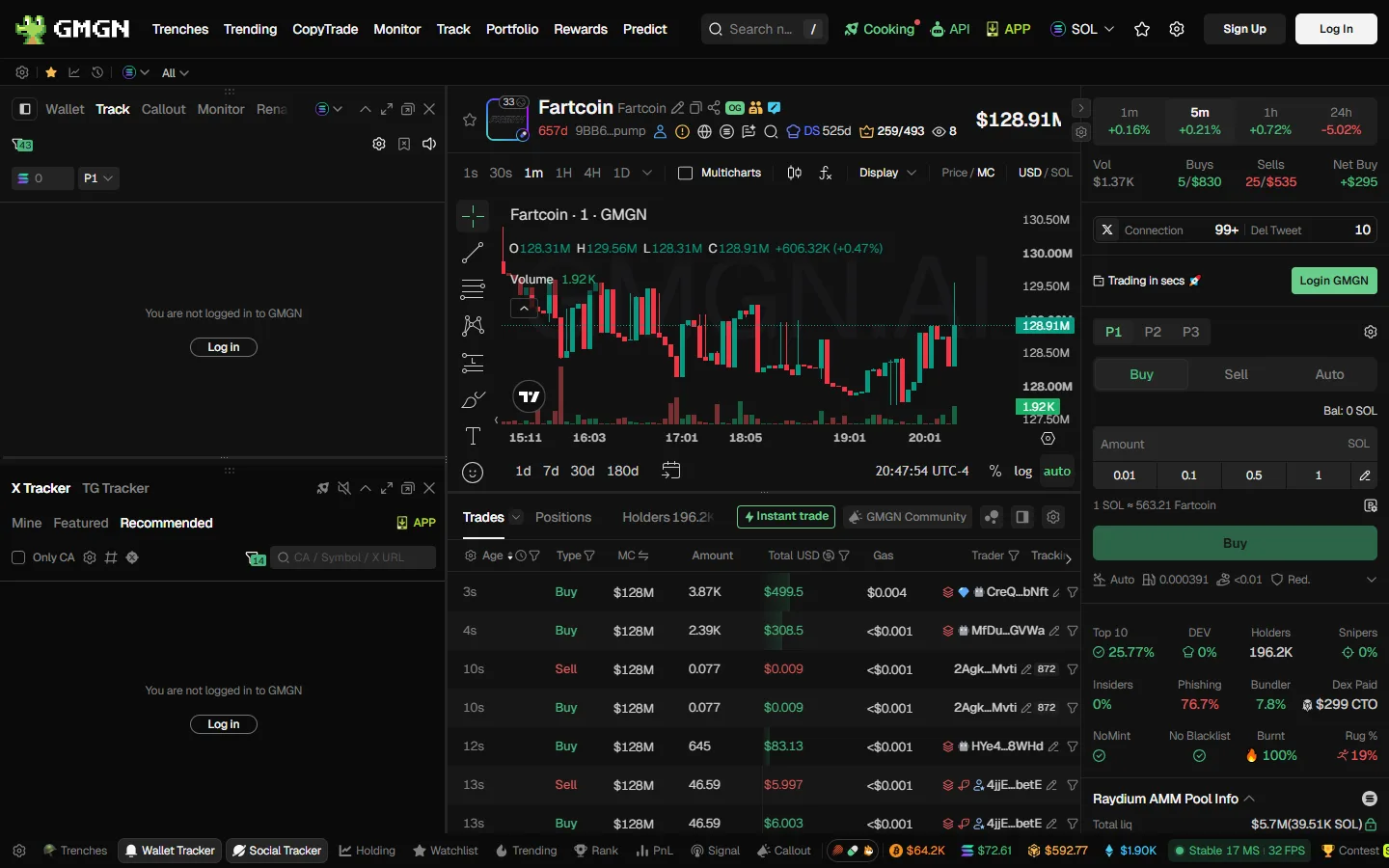
Below the chart, the Activity and Holders tabs classify wallets: smart money, KOLs, whales, snipers, fresh wallets, developers, and wallets flagged as insiders because they hold without ever having bought. GMGN also flags suspected phishing wallets that received tokens they never purchased.
Info
GMGN disclaims the accuracy of all of it. Every doc page carries the same line: data comes from third-party providers, is for reference only, and is not investment advice. A clean audit means nobody has flagged the obvious traps yet, not that the token is safe.
Step 5: Set Slippage and Fees Properly
Here is the settings panel that decides your outcomes. Open it from the gear icon next to the trading module or Instant Trade window.
Slippage is the maximum deviation you will accept in tokens received. GMGN's own worked example: at 30% slippage on a buy, the trade succeeds if you receive between 70% and 100% of the quoted tokens, and fails if you receive less. Its recommendations (source):
| Situation | Slippage | Total on-chain fee |
|---|---|---|
| Manual buy or sell | Auto | 0.002 to 0.005 SOL when speed is not critical |
| Auto buy, auto sell, limit orders | 30% to 35% | 0.006 SOL or higher |
| New or hot tokens | 50% or more | 0.006 SOL or higher |
Priority fee and tip are separate line items. The priority fee goes to validators for faster confirmation; the tip goes to private nodes. Both have a minimum of 0.0001 SOL and a maximum of 2 SOL, and GMGN explicitly does not collect either one.
Anti-MEV protects against sandwich attacks, where a bot sees your pending buy, front-runs it to push the price up, and sells into you. GMGN offers three RPC modes: off protection (all nodes, fastest), reduced protection (limited nodes, still front-runnable), and secure protection (safe nodes, slightly slower, with compensation). Enabling Anti-MEV requires a priority fee of at least 0.002 SOL.
Warning
The fee people complain about is the 1%. The fee that actually eats accounts is the priority fee. GMGN publishes a case in its own FAQ of a user who sold 0.12 SOL of tokens while paying a 0.2 SOL priority fee and then wondered why their balance went down. Match the fee to the trade size. A 0.05 SOL buy does not need a 0.01 SOL priority fee.
Step 6: Place the Trade
With settings dialed in, buying is quick. On the token page, the trading module sits in the right column, with Buy, Sell and Auto tabs. There is also an Instant Trade window you can toggle on below the chart and drag anywhere on screen, which is what most active traders use.
- Pick the wallet. If you run the multi-wallet system, you can select several wallets and they all buy simultaneously.
- Choose Buy for an immediate market buy, or set a limit buy with a trigger price expressed as an absolute number or a percentage move. Limit buy orders expire after 1 hour, 24 hours or 3 days depending on what you select.
- Enter the amount in SOL (or BNB, ETH, TRX) and confirm.
In the Telegram bot the equivalent is even shorter: paste a contract address into the chat and the bot buys at your preset amount, with optional minimum liquidity and maximum market cap filters that block the trade if the token falls outside them.
Open the GMGN Telegram BotStep 7: Manage the Exit
Getting in takes a second. Getting out is where the account is won or lost, and GMGN gives you four tools.
- Take-profit and stop-loss. Set multiple preset TP and SL orders per buy from the Auto tab. Orders created through the bot are valid for 24 hours.
- Trailing take-profit. Arms at your take-profit price, then trails the price down by a drawdown percentage you set. GMGN's suggested pairings are TP +50% with a 10% trail, TP +100% with 15%, and TP +200% with 20%.
- Trailing stop-loss. No activation price, so it starts working immediately, and the stop only ratchets upward.
- Sell inits. A one-click sell of just enough tokens to recover your original cost, calculated as total buy cost minus realized proceeds. It becomes unavailable once you are already in profit on realized terms.
Warning
Auto-sell on GMGN is calculated per purchase, not per position. If you buy the same token three times, you end up with three overlapping sets of TP and SL orders, and they will fire independently. GMGN's own documentation tells you to manually close the earlier auto-sell orders when you add to a position. There is also a hard ceiling of 100 active limit orders per account, which returns error order10008 when you hit it.
Once you are comfortable with manual entries and exits, the automated layers are worth a look: GMGN copy trading mirrors profitable wallets (Solana only, capped at 10 tasks), and the sniper tooling buys the moment a token migrates to a DEX pool.
When Trades Fail, and Why
GMGN publishes a full error taxonomy, which is rare for this category of product and saves a lot of guessing. The four codes you will meet first:
- A1 (timeout): priority fee too low, transaction never got packed. Raise it. Note that a timed-out transaction may still have landed, so check the chain before you retry and accidentally buy twice.
- A2 and C1 (slippage): the price moved further than your slippage tolerance. C1 is the expensive one, because it fails on-chain and still burns your gas and priority fee.
- B1 (insufficient SOL): not enough balance for the trade plus fees. This is the 0.05 SOL reserve rule again.
- D2 (no route): a Pump.fun or Moonshot token in its migration window, untradeable until liquidity opens on Raydium or Meteora. Waiting is the only fix.
There is also a Solana quirk worth knowing before it happens to you: a sell can settle in WSOL rather than SOL. The Solana bot has a one-click WSOL to SOL converter in its Wallet screen. Full diagnostics for every code live in GMGN transaction failed.
Quick Recap
- Log in with Telegram through @gmgnaibot. That unlocks Anti-MEV and every automation feature; a plugin wallet does not.
- Fund the wallet with the right asset on the right network, and leave 0.05 SOL in reserve on Solana.
- Read the audit before you buy: holder concentration, burnt liquidity, rug history, and on EVM the honeypot and tax checks.
- Set slippage and fees to GMGN's own recommended bands rather than leaving defaults on a volatile token.
- Set your exit when you enter, and remember auto-sell is calculated per purchase.
GMGN is fast and cheap by sector standards at a flat 1%, and its documentation beats most of what its rivals publish. It is also a hot wallet you cannot export, pointed at the riskiest asset class in crypto. Both of those are true at the same time. The same settings panel holds a custom RPC field, which is worth knowing about mainly so you do not expect it to make trading cheaper: see how to set a custom RPC in GMGN. Once the first trade is behind you, the GMGN trading guides cover what comes next: copy trading, automated exits and the discovery feeds. If you want to see how it stacks up against the alternatives before committing, start with GMGN vs Photon, and if you want the referral mechanics without the marketing, read the GMGN referral code guide.
Nothing here is financial advice. Memecoins go to zero routinely; trade only what you can afford to lose.
Place Your First Trade on GMGN
A documented flat 1% per transaction, and Anti-MEV protection once you log in with Telegram. Signing up through our link applies referral code ggguide, which earns us a share of GMGN's fee and changes nothing about what you pay.
Trade on GMGNFrequently Asked Questions
A flat 1% of the transaction, charged on the buy and again on the sell. GMGN's fee documentation states it plainly: one 1% handling fee per transaction, no additional charges, with a worked example of a 1 SOL trade paying 0.01 SOL. That page documents no subscription, no sniper surcharge and no extra fee for copy trading, checked 6 August 2026. Priority fees and tips sit on top of that, and GMGN's docs say it does not collect them; they go to validators and private nodes.
We cannot tell you what identity, reporting or compliance obligations apply to you, and nothing here is legal advice. What we can report is what the documents contain. Reading GMGN's terms of service, privacy policy and public documentation on 6 August 2026, we did not find an identity-verification step described in any of them. The login paths those documents describe are a Telegram account or a Phantom wallet, after which GMGN generates trading wallets for you. The same terms list restrictions, naming residents of Afghanistan, Cuba, Iran, North Korea and Syria along with anyone on UN, OFAC or EU sanctions lists. Read those terms yourself, check what applies where you live, and take advice from a qualified professional before you rely on any of it.
GMGN's own guidance is auto slippage for manual buys and sells, 30 to 35 percent for auto buy, auto sell and limit orders, and 50 percent or higher for new or hot tokens. Slippage that is too low is the single most common cause of a failed trade, and on Solana a failed execution still burns your gas and priority fee. Setting it high is not free either: you accept a worse fill in exchange for getting filled at all.
GMGN publishes error codes for this. A1 means your priority fee was too low to get packed. A2 and C1 mean slippage was too low for how fast the price moved, and C1 still burns gas. B1 means you did not leave enough SOL for the trade plus fees, which is why GMGN tells you to keep at least 0.05 SOL in reserve. D2 means a Pump.fun or Moonshot token is mid-migration and temporarily has no route.
Yes, through the Trade with Wallet option using a browser extension wallet, or by logging in with Phantom. GMGN's wallet documentation states that a plugin-wallet session gives up Anti-MEV and the automation features it lists, naming copy trading, auto buy, auto sell, limit orders and the multi-wallet system as requiring a Telegram or Phantom custodial login. The same docs describe the two login methods as separate accounts that do not share your follow list or watchlist.
GMGNGuide is an independent reference published by a third party. It is not affiliated with, produced by, reviewed by, endorsed by or sponsored by GMGN.AI, GraceMatrix Technologies Limited, GMGN Labs Limited, or any of their affiliates. "GMGN" and GMGN's logo are trademarks of their respective owners and are used here only to identify the product this site writes about.
Disclaimer: Nothing on this site is legal, tax, financial or investment advice, and nothing here is a statement about whether any activity is lawful or how it should be taxed where you live. Trading memecoins carries a substantial risk of total loss. Verify anything that matters against GMGN's own documentation and consult a professional qualified in your jurisdiction. Most participants in these markets lose money, and past performance says nothing about future results. This site contains referral links, and GMGN pays us a share of the fees you pay without giving you a discount. See our disclosure for details.
Ready to Start Trading?
GMGN charges a flat 1% per trade across Solana, BSC, Ethereum, Base and Tron. Connect Telegram, fund the wallet, and set your slippage and priority fee before your first buy.
Open GMGN