How to Set a Custom RPC in GMGN (and What It Will Not Fix)
Table of Contents
GMGN's settings panel has a field for a custom RPC endpoint, sitting directly underneath the priority fee and the tip fee. It is one of the few controls on the platform that a trader can get genuinely wrong, because the obvious reading of it is not what GMGN's documentation says it does.
Everything below is read from GMGN's own Fees and Settings documentation and its transaction and limit order failure documentation on 18 August 2026. Where a sentence is our reading rather than GMGN's wording, it says so.
GMGN documents a custom RPC as a backup endpoint used for simultaneous on-chain submission, not as a replacement for its own routing. The same section states that when a custom RPC is used for submission, priority and tip fees are charged at the same rate. So a custom endpoint does not reduce the flat 1%, does not reduce your priority fee or tip, and does not touch slippage.
When is a custom RPC worth setting, and when does it change nothing?
The honest framing is narrow. GMGN describes the RPC node's job as transaction submission, sending transactions to the blockchain for validation and recording. That is the whole of what the setting touches. Everything that decides whether your trade fills at a price you like happens before or after that step.
So it is worth setting when your problem is genuinely about the submission path: you run infrastructure of your own, you have an endpoint you trust more than a shared default under load, or you want a second route on the chain at the same time as GMGN's.
GMGN's own wording is that the custom RPC "will be used as a backup RPC for simultaneous on-chain submission," so what you get is redundancy, not a detour.
It changes nothing at all in three cases that people reach for it in:
- Fees. GMGN charges a flat 1% per transaction on the buy and again on the sell. The custom RPC section states that "if a custom RPC is used for submission, both priority and tip fees will be charged at the same rate." Nothing gets cheaper.
- Slippage. Slippage is a tolerance you authorize, not a network property. A 50% setting authorizes a fill half a level below the quote whichever endpoint carries it.
- Most documented failures. GMGN's error table attributes A1 to a low priority fee and A2 to low slippage. Those are settings.
Warning
The one failure mode GMGN attributes to an RPC is its own Anti-MEV service. Codes A3 and H3 both read "Anti-MEV RPC service failure," and GMGN's documented fix for both is to switch to normal mode by turning Anti-MEV off, not to add an endpoint of your own. Our reading of that pairing: the custom field is a backup for the ordinary submission path, and it is not offered as a substitute for the protected one. Full code table in GMGN transaction failed.
Where does the custom RPC setting live in GMGN?
There is no separate RPC screen. GMGN documents the field in section 5 of its Fees and Settings page, headed "Priority fee, Tip fee, Custom RPC," which is the same panel you open to set the two fee values before a trade. The Anti-MEV RPC submission control sits in the same block.
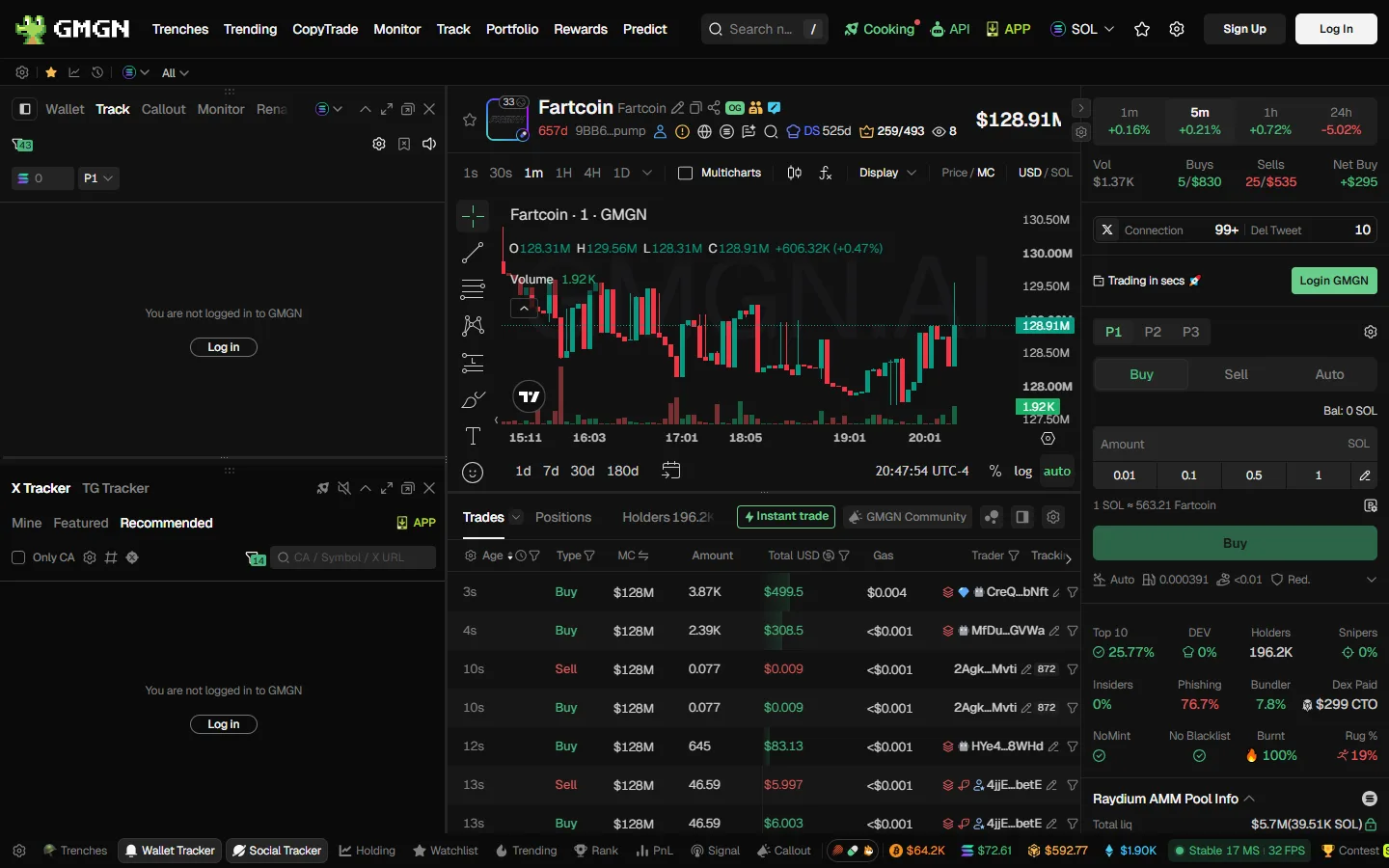
The row under the Buy button is the one to look at. It shows the current slippage mode, the priority fee value and the Anti-MEV state, and the settings control beside it opens the panel where all of those and the custom RPC field live.
The capture above is a logged-out session, which is why the balance reads zero.
Setting It, Step by Step
Open the fee and settings panel
The same panel that carries the priority fee and tip fee. GMGN documents all three together rather than giving the RPC its own screen.
Pick the submission mode first
GMGN's Anti-MEV RPC submission control has three states: off protection sends to all nodes and is very fast; reduced protection sends to limited nodes, is fast, and may be front-run; secure protection sends to safe nodes, is slightly slower, and carries compensation. This choice does more to your execution than the custom field does.
Paste the endpoint URL
GMGN describes the field as connecting to a specific RPC server, self-hosted or third-party provided. Its documentation describes no separate authentication field, so an endpoint that carries its credentials in the URL is the shape that fits.
Set your fees as normal
GMGN's guidance is unchanged: a total on-chain fee of 0.002 to 0.005 SOL when speed does not matter, 0.006 SOL or more for auto buy, auto sell and limit orders. Anti-MEV needs a priority fee of at least 0.002 SOL to enable at all.
Verify on a block explorer
Place one small trade and open its transaction hash on Solscan. GMGN's own documentation points users at the transaction hash to see what a trade actually cost, and it is the only view that shows you what landed rather than what was requested.
Which RPC endpoint should you choose?
This site does not rank RPC providers and GMGN's documentation names none, so what follows is a description of what to compare rather than a recommendation.
The endpoint's job here is narrow: accept a signed transaction and get it in front of validators. Submission latency is mostly geography and peering, so an endpoint two hops away will usually beat a better-marketed one on another continent, and that is worth checking before anything on a pricing page is.
The property people skip is behavior under load. Memecoin trading is a burst workload, and the minute you care about is the minute everyone else is also submitting, which is exactly when a shared endpoint starts shedding requests.
What a provider does at its rate limit tells you more than its headline throughput does. That matters more again if you run auto buy or copy trading, because then the request rate is set by the market rather than by you.
Info
Running your own node is the self-hosted path GMGN's wording allows for, and it is the only version of this that puts the submission path fully under your control. It is also a real piece of infrastructure with real running costs, which is a different decision from pasting a URL into a settings field. Nothing in GMGN's documentation describes any GMGN-side benefit for doing it.
How do you verify the custom RPC took effect?
GMGN's documentation does not describe a confirmation indicator for the custom RPC field, so there is no in-app light to look for. What it does describe is the transaction hash as the place to see what a trade actually did, and that is the check available to you.
Place one small trade, open its signature on Solscan, and read the fee lines. You are looking for the priority fee and tip you set, at the values you set them, which is the documented behavior when a custom RPC carries the submission.
If those values are not what you chose, the setting is not your problem: the fee fields are.
What does a custom RPC fix, and what does it not?
A summary, because the misconception this setting attracts is expensive.
It can help with: a submission path you have a specific reason to distrust, and redundancy on the way to the chain, since GMGN submits through both simultaneously.
It does not touch: the flat 1% handling fee, the priority fee, the tip fee, gas, slippage, the price you are quoted, or the launchpad's own cut on a token issued through Pump.fun or another platform.
It is not the documented fix for: A1 timeouts, which GMGN attributes to a low priority fee; A2 timeouts, attributed to low slippage; C1 execution failures, where the transaction reached the chain and reverted on slippage while still consuming gas; or D1 to D3 route errors, where no trading route exists at all. Every one of those has a different documented remedy, and they are worked through code by code in GMGN transaction failed.
If you are here because trades keep failing, start with that table rather than with this field. The three settings GMGN itself tells failed users to check first are slippage, priority fee and Anti-MEV, in that order, and none of them is an endpoint.
Open GMGN With Code ggguide
A documented flat 1% per transaction, on the buy and again on the sell. Our link carries the referral code ggguide, which pays this site a share of the fee you already pay and changes nothing about your rate.
Open GMGNNothing here is financial, tax or legal advice, and none of it is a statement about what any setting will do to a particular trade. GMGN revises its documentation without notice, so confirm the current wording in its own Fees and Settings page before you rely on any of the above.
Frequently Asked Questions
No. GMGN's fee documentation states a flat 1% handling fee per transaction with no additional charges, and nothing in the custom RPC section changes that. The same section states that if a custom RPC is used for submission, both priority and tip fees are charged at the same rate, so the on-chain side does not get cheaper either. Read 18 August 2026.
No, it uses both. GMGN's documentation says a custom RPC will be used as a backup RPC for simultaneous on-chain submission. That is a second path for the same transaction rather than a replacement for GMGN's routing, which is the single most common misreading of this setting.
In the same settings panel as the priority fee and the tip fee. GMGN documents all three together in section 5 of its Fees and Settings page, titled Priority fee, Tip fee, Custom RPC, alongside the Anti-MEV RPC submission control. There is no separate RPC screen described anywhere in that documentation as read on 18 August 2026.
It depends which failure you are hitting, and for most of the documented codes the answer is no. GMGN's own error table attributes A1 to a low priority fee, A2 to low slippage, and A3 and H3 specifically to Anti-MEV RPC service failure, where its stated fix is switching Anti-MEV off rather than adding an endpoint. Slippage and priority fee are settings, not routing, and no endpoint changes them.
This site does not rank or recommend RPC providers, and GMGN's documentation names none. It describes the field as accepting a server that is self-hosted or third-party provided and leaves the choice to you. What to compare is the same for any endpoint: where its nodes are relative to you, what it does under load, and whether its rate limits fit how often you trade.
GMGNGuide is an independent reference published by a third party. It is not affiliated with, produced by, reviewed by, endorsed by or sponsored by GMGN.AI, GraceMatrix Technologies Limited, GMGN Labs Limited, or any of their affiliates. "GMGN" and GMGN's logo are trademarks of their respective owners and are used here only to identify the product this site writes about.
Disclaimer: Nothing on this site is legal, tax, financial or investment advice, and nothing here is a statement about whether any activity is lawful or how it should be taxed where you live. Trading memecoins carries a substantial risk of total loss. Verify anything that matters against GMGN's own documentation and consult a professional qualified in your jurisdiction. Most participants in these markets lose money, and past performance says nothing about future results. This site contains referral links, and GMGN pays us a share of the fees you pay without giving you a discount. See our disclosure for details.
Ready to Start Trading?
GMGN charges a flat 1% per trade across Solana, BSC, Ethereum, Base and Tron. Connect Telegram, fund the wallet, and set your slippage and priority fee before your first buy.
Open GMGN