How to Connect Telegram and Fund Your GMGN Wallet
Table of Contents
Getting money into GMGN is straightforward, but the wallet model behind it is not what most people assume, and a couple of steps are one-way. This guide covers connecting Telegram, which bot belongs to which chain, what asset to send on each network, how the Solana multi-wallet system works, and how withdrawals are gated.
If you are setting this up from a phone, is there a GMGN mobile app covers which surface can do what, including the fact that no phone surface withdraws without a browser session. Read the custody section before you deposit anything meaningful. GMGN's wallet is a hot trading account, and per GMGN's own documentation the exit runs through GMGN's withdrawal flow. Whatever the thinking behind that setup, the observable effect is what matters to you: getting money out is GMGN's process, on GMGN's timing.
GMGN generates wallets for you on first Telegram login: one Solana address, one shared address for Ethereum, Base and BSC, and one Tron address. You fund each with that chain's native gas asset. You cannot export the private key on any chain, including wallets you imported yourself, so funds leave only through GMGN's website withdrawal flow, which requires Google Authenticator and a whitelisted address.
Step 1: Connect Telegram
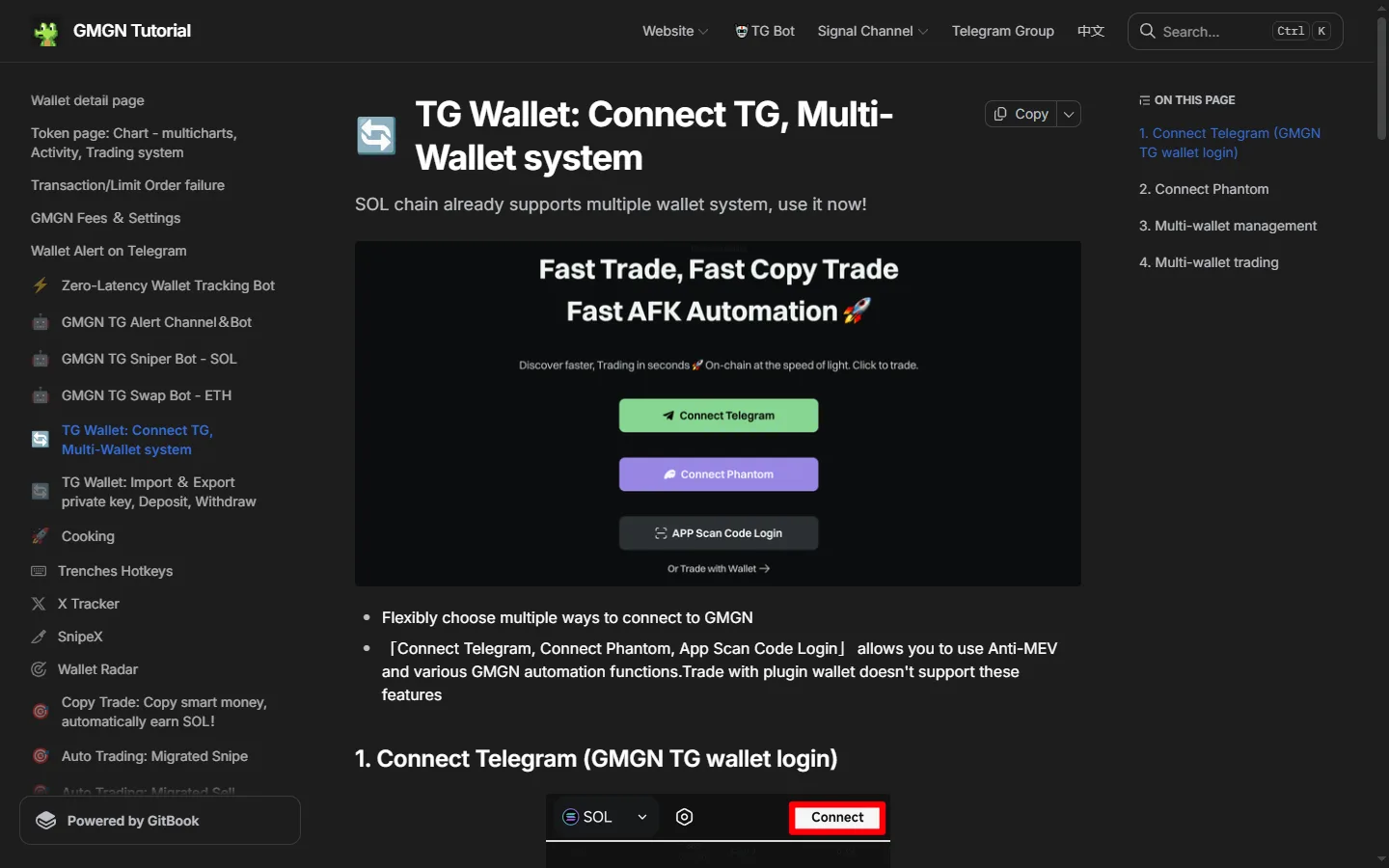
Open gmgn.ai, click Connect in the top right, and pick Connect Telegram.
Open the login bot
GMGN redirects you to Telegram and opens @gmgnaibot. This bot exists only for website login; it is not the trading bot.
Use the one-time link
The bot replies with a Login Website link. It works exactly once. If you want to be logged in on a different browser, paste the link into that browser instead of clicking it where you are.
Collect your generated addresses
On first login GMGN creates a wallet address on each supported chain. Ethereum, Base and BSC share one address across all three, differing only by network. Solana and Tron each get their own.
Open the chain bots you need
The login bot links out to the per-chain trading bots. Open the one for the chain you plan to trade and send /start.
Two other login paths exist. Connect Phantom builds what GMGN describes as a "multi-chain custodial wallet account" derived from your Phantom wallet, with new addresses generated per chain; if you later want to log in from another device you have to import that same Phantom wallet there first. Trade with Wallet connects a browser extension and keeps your keys where they are, but GMGN's docs state that it gives up Anti-MEV and the automation features they list, and that it behaves as a separate account whose watchlist and follow list are not shared with your Telegram session.
Info
Telegram login and Phantom login do not merge. If you set up follows and watchlists under one and then switch, the other starts empty. Pick one and stay on it. If a login fails or opens an account you do not recognize, our GMGN login checklist goes through the usual causes.
Step 2: Pick the Right Bot for Your Chain
GMGN runs a separate Telegram bot per chain, plus several utility bots. Sending a Solana contract address to the BSC bot does nothing useful, and sending funds to the wrong bot's address can be unrecoverable.
| Chain | Trading bot | Deposit network | Asset to send |
|---|---|---|---|
| Solana | @GMGN_sol_bot | Solana | SOL |
| BNB Smart Chain | @GMGN_bsc_bot | BNB Smart Chain | BNB |
| Ethereum | @GMGN_swap_bot | Ethereum | ETH |
| Base | @GMGN_base_bot | Base | ETH |
| Tron | @GMGN_tron_bot | Tron (TRC20) | TRX |
Each chain also has numbered parallel handles, such as @GMGN_sol02_bot through @GMGN_sol04_bot and @GMGN_bsc02_bot. GMGN's bot directory lists them alongside the primary handle without describing a difference between them, and its sniper documentation tells users to switch to one of the numbered handles if responses slow down. How they are actually deployed is not something GMGN publishes, so we report what the directory says and leave it there. Separate from trading, @gmgnaibot handles website login, @GMGNAI_bot answers contract address queries inside group chats, @GMGN_alert_bot and @GMGN_ETH_alert_bot push wallet alerts, and @GMGN_SupportBot is the manual support channel. The complete list is published in GMGN's own bot directory.
Warning
Verify every bot handle character by character. GMGN documents a specific scam pattern: fake bots registered with a capital "I" standing in for a lowercase "l", which is indistinguishable in most Telegram fonts. GMGN also states that its admins never DM you first and never ask for a private key, and it warns against clicking the sponsored ads Telegram displays above bot chats.
Step 3: Fund the Wallet
There are two ways to get your deposit address.
From the website: after logging in with the TG wallet, click Transfer Funds in the top right. If no browser extension wallet is connected you get a QR code and address to send to from any wallet app. If an extension wallet is connected, you can type an amount and click Deposit to move funds across directly.
From the bot: send /wallet to the chain's trading bot, or tap the Wallet button, and the bot shows your address with a tap-to-copy control.
Then send the native asset from the table above. GMGN's warning is worth quoting because it is absolute: "Please make sure that the transfer network is correct. If you deposit via the wrong network, there is no way to retrieve it" (source).
How much to send
On Solana, GMGN recommends keeping at least 0.05 SOL in the wallet as reserve. That figure comes straight from its error documentation: code B1 is a submission failure caused by not having enough SOL for the trade amount plus the gas and priority fee, and the reserve is the published fix. Fund your intended trade size on top of that reserve, not including it.
There is no documented minimum deposit and no deposit fee from GMGN's side. What you pay per trade is a flat 1% of the transaction, charged on the buy and again on the sell, plus a priority fee and tip you set yourself (minimum 0.0001 SOL each, maximum 2 SOL each) that go to validators and private nodes rather than to GMGN. The full cost model is in GMGN fees explained.
Warning
The GMGN wallet does not convert stablecoins into gas. GMGN says plainly that its TG wallet "does not support exchanging stablecoins such as USDT/USDC to SOL/ETH." If you deposit USDT or USDC by mistake, the only route out is to search that stablecoin's contract address on GMGN and sell the position like any other token, which means you need a little native gas in the wallet already. Sending stables to an empty GMGN wallet leaves you stuck.
Fund a GMGN Wallet and Start Trading
One Telegram login gives you wallets on Solana, BSC, Ethereum, Base and Tron, with a flat 1% per transaction and no subscription. Our link carries referral code ggguide, which pays us a share of GMGN's fee and costs you nothing extra.
Get Started on GMGNThe Custody Reality: No Private Key Export
This is the single most misreported fact about GMGN, and plenty of guides still get it wrong.
GMGN's wallet documentation states it twice, in two separate places, in these words: "For the safety of user wallet funds, GMGN all chains ( SOL chain / EVM chain / Tron chain ) are prohibited from exporting private keys; Wallets imported from outside also can't export private keys" (source).
What that means in practice:
- The docs describe no seed phrase to write down and no export button. Treat anyone offering to reveal one for you as a risk, because GMGN's documentation says the platform does not provide it.
- Importing a wallet you already own does not restore your control, on GMGN's own description of the feature. It gives GMGN a key you also hold.
- On that documentation, funds leave a GMGN wallet through GMGN's withdrawal flow, or they do not leave.
- The self-custodial route GMGN documents is the Trade with Wallet browser extension path, which trades away Anti-MEV and the automation features it lists to get there.
Reporting dates the change to around March 2025, and GMGN's stated reason at the time was that users were being robbed after exporting keys onto compromised devices. The tradeoff cuts both ways whatever the reasoning: the restriction closes an attack path, and it also closes the independent exit. GMGN's terms of service still contain the older claim that you "retain control over your private keys," which contradicts the documentation. We work through that contradiction, the hosted-key architecture and what it means for your risk in is GMGN safe and who holds your keys.
Warning
Importing a private key into any EVM bot deletes your old wallet. GMGN's documentation: importing a key into the Ethereum, Base or BSC bot changes the address across all three at once, and "the old wallet address will be automatically deleted. There is no way to help you recover your assets!" Before you import anything on EVM, withdraw every asset from the existing address on all three networks. The Solana bot behaves differently and sends you to the multi-wallet manager instead of overwriting. The Tron bot does not support import at all.
Treat a GMGN wallet the way you would treat a balance sitting on a centralized exchange: fine for the size you are actively trading, wrong for anything you want to hold. Withdraw profits to a wallet you actually control instead of letting them accumulate in the terminal.
The Multi-Wallet System (Solana)
Once you are logged in with the TG wallet, Wallet Manager in the top right opens the multi-wallet page. It is Solana-only and it is one of the better reasons to use GMGN over a simpler bot.
- Create wallet generates a new Solana wallet in one click, up to 10.
- Import wallet brings in an existing Solana private key, also capped at 10, and unlike the EVM bots it does not delete anything.
- Make primary sets your default trading wallet. Rename helps you tell them apart. Archive suspends one.
- Operation log shows your import and management history.
On the token page you can tick several wallets and trade them simultaneously: a buy fires from every selected wallet at once, and a sell applies the same percentage to each wallet's holding independently. GMGN notes that the multi-wallet system currently supports direct buy and sell transactions only.
Warning
Archiving a wallet closes everything attached to it. GMGN states that all open orders, wallet copiers and CTO copier strategies on that address are closed automatically when you archive. Settle positions before archiving, or restore the wallet from the archive list to get the address back.
Consolidate sweeps SOL and memecoins from several wallets into one; Distribution pushes assets from one wallet out to many, either proportionally or in fixed amounts. Both require 2FA and both only display tokens worth more than 10 USDT. Consolidate is also the practical route for getting memecoins (not just SOL) out to an address you control.
If you plan to run copy trading, the multi-wallet system is how you separate a copy-trade wallet from your manual trading wallet so the two do not interfere.
Withdrawing: Every Gate Explained
Most "my GMGN withdrawal is stuck" complaints describe a hold that GMGN publishes in its own documentation. Here is the whole sequence.
The bot cannot withdraw. GMGN moved withdrawals off Telegram entirely and onto the website. Tapping Withdraw in the bot just deep-links you to gmgn.ai.
Google Authenticator is mandatory. Bind it under Security in the top right of the site. GMGN recommends choosing "Use Authenticator without an account" to disable Google's cloud sync, on the reasoning that a compromised Google account would otherwise hand an attacker every one of your 2FA codes at once. That is sound advice regardless of GMGN.
A withdrawal whitelist is required. Transfers only go to addresses you have whitelisted. Once an address is whitelisted, sending to it skips the 2FA prompt.
Then the time locks:
| Event | Withdrawal hold |
|---|---|
| First whitelist setup | 3 hours |
| Any change to a whitelist address | 3 hours |
| Re-binding Google Authenticator | 24 hours |
If the site says an operation "is not allowed after high risk behavior," you are most likely inside one of these locks, or a related one GMGN's app applies after a password change or a new sign-in. The high risk behavior guide shows how to read the unlock time.
"Max" leaves a residue. Each on-chain wallet has to keep a minimum balance for rent and transfer gas, so a Max withdrawal leaves a little behind. That is the chain's requirement showing through, not an error.
One related cleanup worth knowing: on Solana, token accounts worth under $10 can be closed from the assets page to reclaim roughly 0.002 SOL of account rent each. If the Reclaim Rent button is missing, it usually means GMGN already reclaimed it automatically when you sold out of the position.
If a transaction fails rather than a withdrawal stalling, the cause is almost always slippage, priority fee, or an insufficient balance, and GMGN publishes a code for each one. See GMGN transaction failed for the full map.
What to Do First
- Log in with Telegram through @gmgnaibot, verifying the handle before you click anything.
- Open the bot for the chain you actually trade and copy your deposit address from there.
- Send the native asset on the matching network, with 0.05 SOL of headroom on Solana.
- Bind Google Authenticator and set a whitelist immediately, before you have a reason to withdraw in a hurry, so the three-hour lock expires while you are still learning the interface.
- Withdraw profits regularly instead of letting a balance accumulate in a wallet whose key you cannot export.
With funding sorted, the next step is placing trades and setting slippage and priority fees to sensible values, which is covered in how to trade on GMGN. For background on the platform, who runs it and how it makes money, read what is GMGN, and for the honest version of how the referral program works, see the GMGN referral code guide.
This is not financial advice. Memecoin trading carries a high probability of total loss on any given position.
Connect Telegram and Fund Your Wallet
Trade Solana, BSC, Ethereum, Base and Tron memecoins from one Telegram login at a flat 1% per transaction. Signing up through our link applies referral code ggguide, which earns us a share of GMGN's fee and changes nothing about what you pay.
Open GMGNFrequently Asked Questions
No. GMGN's wallet documentation states that all chains, Solana, EVM and Tron, are prohibited from exporting private keys, and that wallets imported from outside cannot export either. It describes no seed phrase to write down. Reporting from around March 2025 dates the change to that period, and GMGN's stated reason at the time was that users were being robbed after exporting keys onto compromised devices. An older sniper bot page still mentions exporting keys, so GMGN's own doc set is inconsistent on this point; the dedicated wallet pages carry the more recent wording.
@gmgnaibot handles website login. For trading, Solana uses @GMGN_sol_bot, Ethereum uses @GMGN_swap_bot, Base uses @GMGN_base_bot, BNB Smart Chain uses @GMGN_bsc_bot, and Tron uses @GMGN_tron_bot. Each chain also has numbered parallel instances such as @GMGN_sol02_bot. Check handles character by character before you send anything: GMGN warns that scammers register lookalike bots using a capital I in place of a lowercase L.
The native gas asset of the chain, over that chain's own network. Solana takes SOL, Ethereum takes ETH over Ethereum, Base takes ETH over Base, BNB Smart Chain takes BNB, and Tron takes TRX over TRC20. A deposit sent on the wrong network cannot be recovered. GMGN's wallet cannot swap stablecoins into gas either, so USDT or USDC sent by mistake has to be sold as a token, which requires you to already hold a little native gas.
GMGN's documentation places withdrawals on the website rather than in the Telegram bots, and tapping Withdraw in a bot deep-links you to gmgn.ai. Before you can withdraw you must bind Google Authenticator under Security on gmgn.ai and set a withdrawal whitelist. Withdrawals are then held for three hours after a first whitelist setup or any whitelist change, and for 24 hours after re-binding Google Authenticator. Those hold periods are published in GMGN's own documentation, so a wait that matches them is the documented flow running rather than a fault or an account freeze.
No. GMGN states that wallets imported from outside also cannot export private keys, so importing hands GMGN a key you already hold rather than the reverse. On the EVM bots it is worse than neutral: importing a new private key changes the address across the Ethereum, Base and BSC bots simultaneously and automatically deletes the old wallet address, with GMGN stating there is no way to recover the assets on it.
GMGNGuide is an independent reference published by a third party. It is not affiliated with, produced by, reviewed by, endorsed by or sponsored by GMGN.AI, GraceMatrix Technologies Limited, GMGN Labs Limited, or any of their affiliates. "GMGN" and GMGN's logo are trademarks of their respective owners and are used here only to identify the product this site writes about.
Disclaimer: Nothing on this site is legal, tax, financial or investment advice, and nothing here is a statement about whether any activity is lawful or how it should be taxed where you live. Trading memecoins carries a substantial risk of total loss. Verify anything that matters against GMGN's own documentation and consult a professional qualified in your jurisdiction. Most participants in these markets lose money, and past performance says nothing about future results. This site contains referral links, and GMGN pays us a share of the fees you pay without giving you a discount. See our disclosure for details.
Ready to Start Trading?
GMGN charges a flat 1% per trade across Solana, BSC, Ethereum, Base and Tron. Connect Telegram, fund the wallet, and set your slippage and priority fee before your first buy.
Open GMGN