GMGN Transaction Failed: Every Error Code and How to Fix It
How we verified this
- Last checked by hand
- October 20, 2026
- Checked against
- GMGN's transaction and limit order failure documentation, re-read for every code from A1 to L3
- GMGN's ETH/Base/BSC trading API reference, for the slippage, gas price and simulation behavior on EVM chains
- The API Management text strings and error handling in gmgn.ai's own web app code, read October 20, 2026, for the insufficient_assets message
- Who checked it
- Concept211 (@Concept211), who writes and maintains this site. It is a one-person publication with no relationship to GMGN. A figure we could not reach a primary source for is labeled unverified on the page instead of estimated, and the re-check schedule is set out in the methodology. If something here looks wrong, tell us and we will re-check it.
Table of Contents
- Start here: GMGN's own triage order
- Timeouts: A1, A2, A3
- Submission failures: B1 to B5
- Execution failure: C1
- No available route: D1, D2, D3
- Limit orders and automation: G1, H1 to H3, J1, J2, K1 to K5, L1 to L3
- Why does GMGN say "No Available Router"?
- What it means mechanically
- The conditions that reproduce it
- The fix, in order
- Telling it apart from the failures next to it
- What does "key-service error: insufficient_assets" mean on GMGN?
- What do GMGN's raw error strings mean?
- What if none of the error codes match?
- What about a failed trade on BSC?
- Confirm it on Solscan
- The fix checklist
A failed trade on https://gmgn.ai is rarely a broken platform. GMGN publishes a full error-code table for transactions and limit orders, and nearly every code in it points at one of three settings you control: slippage, priority fee, and whether Anti-MEV is switched on. The remaining codes point at something that cannot be fixed at all, and knowing which bucket you are in saves a lot of wasted retries.
This guide walks through every published code from A1 to L3, what each one actually means, and what to change. All of it comes from GMGN's transaction and limit order failure documentation, checked August 6, 2026 and re-read September 25, 2026 with no code added or removed.
GMGN groups failures by where they died. Codes A1 to A3 are timeouts. B1 to B5 never reached the chain and cost you nothing. C1 did reach the chain, failed on slippage, and still consumed gas and priority fee. D1 to D3 mean no trading route exists. Limit orders use a parallel set: G1, H1 to H3, J1, J2, K1 to K5, L1 to L3.
Start here: GMGN's own triage order
Before opening the code table, GMGN tells failed users to check three things, in this order. Every number in the three points below is quoted from GMGN's transaction and limit order failure documentation, read 6 August 2026:
- Slippage. Auto for manual buys and sells. 30 to 35% for automated orders and limit orders. 50% or more for new and hot tokens.
- Priority fee and tip. 0.002 SOL total when speed does not matter. 0.006 SOL or above for auto buy/sell and limit orders, and manually higher again when the network is busy.
- Anti-MEV. It blocks sandwich attacks, but it requires a priority fee of at least 0.002 SOL and it routes through a smaller set of nodes that can fail independently.
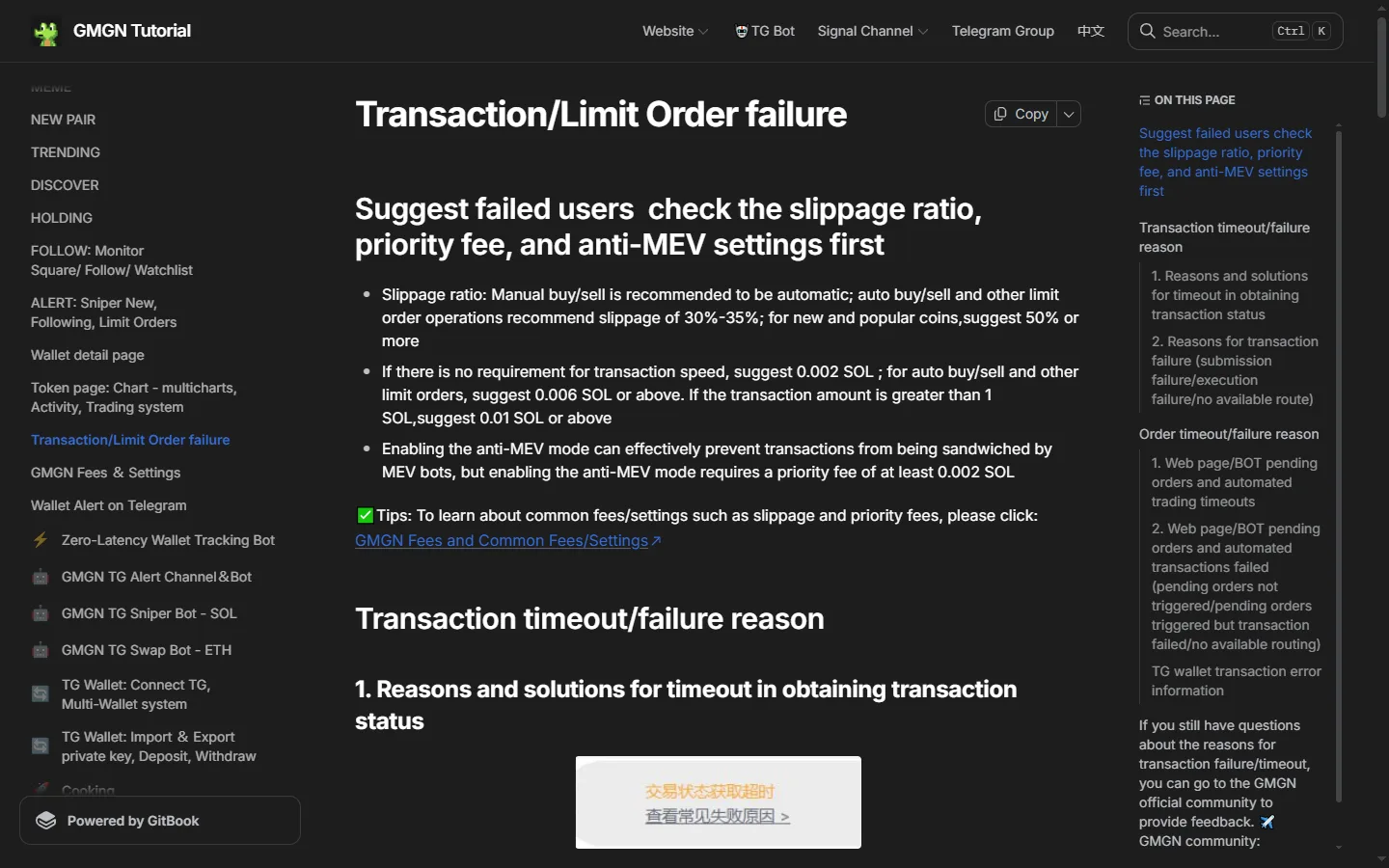
Those numbers are recommendations, not rules, and the fee ones get expensive fast on small positions. We price that out properly in GMGN fees explained. For now, treat them as the settings to move first.
Info
GMGN's error numbers appear in the Telegram wallet's error messages and in the web interface. GMGN notes it cannot capture error information from browser extension wallets, so if you are trading through a Web3 plugin wallet you will have to diagnose from the chain instead. See connect Telegram and fund your GMGN wallet for how the two wallet paths differ.
Timeouts: A1, A2, A3
A timeout is not the same as a failure. GMGN warns that "the transaction may be successful even if it is timed out, and you need to check the status on the chain." Do not retry a timed-out buy until you have confirmed on Solscan that it did not land, or you can end up holding twice the position you wanted.
| Code | What it means | Fix |
|---|---|---|
| A1 | Priority fee too low, so nodes were slow to pack the transaction and the countdown expired | Increase the priority fee |
| A2 | Slippage too low to trigger while the price was moving hard | Increase the slippage ratio |
| A3 | The Anti-MEV RPC service itself failed | Switch to normal mode, meaning turn Anti-MEV off |
A3 is the one people miss. Anti-MEV routes your transaction through a restricted set of nodes. When that path degrades, your trades stop going through while everything else on Solana works fine. If you are getting repeated timeouts and your fees are already generous, turn Anti-MEV off and try once. If the trade lands immediately, you have found your answer. Turn it back on for your next large buy into a thin pool, since that is where sandwich bots make their money. A custom endpoint is not the fix for this one either, for reasons worked through in how to set a custom RPC in GMGN.
Submission failures: B1 to B5
These never reached the chain. Nothing was spent.
| Code | What it means | Fix |
|---|---|---|
| B1 | Insufficient SOL for the trade amount or for gas | Keep at least 0.05 SOL in the wallet as a reserve |
| B2 | Not enough of the token in the wallet when selling | Check your actual token balance and size the sell within it |
| B3 | Buy rejected because the token itself restricts buying, often during a launch window | Check the token's social channels for launch restrictions |
| B4 | Sell rejected because the token is a Pixiu (honeypot) or your address is blacklisted | If confirmed, it cannot be sold |
| B5 | The wallet still displays as logged in, but the session is invalid | Reconnect the wallet |
B1 is the most common failure on GMGN and the easiest to prevent. The 0.05 SOL reserve exists because a Solana wallet needs SOL for gas, for account rent on any new token account, and for the priority fee, all separate from the amount you are spending. "Max" buys are what usually trip it.
B4 is the one that ruins people. Pixiu is the Chinese term GMGN uses for a honeypot: a token you can buy and cannot sell, either because the contract blocks selling or because the deployer has blacklisted your address. GMGN's documented answer offers no workaround, and neither slippage nor priority fee is the constraint here, because the block sits in the token contract rather than in the terminal. Assume the position is gone.
The defense happens before the buy, not after. GMGN ships CA Security Checks on every token page (mint authority, top-10 holder concentration, blacklist flags, pool burn percentage, rug probability, and the deployer's rug history), plus GoPlus-sourced honeypot detection on EVM chains. Reading that panel takes five seconds and is the single highest-value habit on the platform. The how to trade on GMGN guide covers where it sits in the interface.
B5 deserves more attention than its one-line description suggests. Your wallet looks connected. The interface behaves normally. Orders simply never go anywhere. If GMGN starts refusing everything at once and your balances look fine, log out and reconnect before you touch any other setting.
Warning
If a wallet balance has actually gone missing rather than a trade failing, this is not an error code. GMGN states that it "does not perform any operations on the user's wallet," and the causes its documentation lists are device malware, fake Telegram bots, cloned groups and malicious wallet approvals. We cover the custody model and what GMGN can and cannot do in is GMGN safe.
Execution failure: C1
| Code | What it means | Fix |
|---|---|---|
| C1 | The transaction reached the chain and then reverted, almost always on slippage | Raise slippage, or use auto slippage, when the token is new or in a FOMO move |
C1 is the expensive one. GMGN's own wording: "Failure to submit to the chain for execution will consume Gas/priority fee." Your transaction was packed into a block, tried to execute at a price the pool could no longer offer, and reverted. The validator keeps the fee for the work.
GMGN's position is that this money goes to the chain rather than to GMGN, and that matches what the explorer shows for a reverted transaction. There is nothing sitting with the platform to refund. A string of C1s during a violent minute can drain a meaningful amount of SOL with no position to show for it, which is the strongest argument for using auto slippage on manual trades instead of a low fixed number.
The counterweight matters too. Raising slippage to stop C1 errors means accepting worse fills. At 30% slippage a buy succeeds when you receive 70 to 100% of the quoted tokens; at 50% you accept as little as half. That reading of what a slippage setting authorizes is ours, worked out from the setting itself rather than quoted from GMGN, which documents the recommended percentages without spelling out the fill range they permit. You are choosing between a fee you definitely pay on failure and a price you might pay on success. That trade-off is worked through in GMGN fees explained.
No available route: D1, D2, D3
| Code | What it means | Fix |
|---|---|---|
| D1 | The creator pulled liquidity, so no route exists | Nothing to do. Check whether the pool was burned before buying next time |
| D2 | A Pump.fun or Moonshot token is mid-migration to a DEX pool | Wait for the migration to complete, then trade |
| D3 | Solana congestion, or a problem at GMGN's node provider | Wait, retry, and report it to the community if it persists |
D1 is what GMGN's table calls a creator pulling liquidity. The pool that made the token tradeable is gone, so there is no route to quote against. GMGN's advice is preventative: confirm the pool has been burned before trading, since a burned pool cannot be pulled. The pool burn percentage is one of the fields in the security panel.
D2 catches people constantly and is completely normal. When a bonding-curve token graduates, the launchpad is building a real pool on Raydium or Meteora, and for that window the token cannot be traded anywhere. GMGN documents the threshold as a $69,000 market cap, which is Pump.fun's historical graduation figure and has moved over time, so treat the number as indicative and the mechanic as the point. The wait is typically minutes. If you want to be positioned the moment it opens, GMGN's Migrated Snipe feature creates the buy in advance, though the task has to be set up before migration begins.
All three of these surface to a Telegram-wallet user as one string, No Available Router, which is covered in full further down.
D3 is not your fault and not fixable from your side. GMGN routes through node providers and inherits their outages. If a specific token fails for you and works for others, it is not D3. If everything fails at once, it probably is, and GMGN asks users to report it in the official Telegram community.
Fix the settings, not the platform
Most GMGN failures come down to slippage, priority fee and Anti-MEV. Set all three before your next trade. Not financial advice.
Open GMGNLimit orders and automation: G1, H1 to H3, J1, J2, K1 to K5, L1 to L3
Limit orders, auto buy/sell, take-profit and stop-loss run through a parallel error set, because there are two moments that can fail: creating the order, and executing it once triggered.
Creation failure
| Code | What it means | Fix |
|---|---|---|
| G1 | The network was unstable while the order was being created | Refresh the page and create the order again |
G1 is worth taking seriously rather than dismissing. An order that fails to create leaves you with no stop-loss on a live position, and nothing in the interface shouts about it. After creating any protective order on a flaky connection, go back to the Holding or Orders tab and confirm it is actually listed.
Timeouts on triggered orders
H1, H2 and H3 mirror A1, A2 and A3 exactly: low priority fee, low slippage, and Anti-MEV RPC failure. The fixes are identical. H3 is the same trap as A3, and it is worse for automation, because a broken Anti-MEV path can silently kill every automated exit you have set while you are away from the screen.
Orders that never trigger
| Code | What it means | Fix |
|---|---|---|
| J1 | A wick made it look like your price was hit, but the order could not trigger | None. GMGN classifies this as normal behavior |
| J2 | The wallet shows as logged in but the session has expired | Reconnect the wallet |
J1 is the code that generates the most anger, and GMGN's answer is unsatisfying. Verbatim from the documentation: "The pin insertion situation basically cannot be triggered, which is a normal situation and does not need to be solved."
"Pin" here means a wick, a candle that spikes to your price and retraces within the same instant. The chart records the extreme; the order book never offered a fill there. Your limit order needed a real, executable price that held long enough for a transaction to be built, submitted and packed into a block, and a wick does not provide one. That is a constraint of on-chain settlement rather than something specific to GMGN, and I have not found a user-side setting on GMGN that works around it. If your exit depends on catching a spike that lasts a fraction of a second, a limit order is the wrong tool; a trailing take-profit that arms at a level and then follows the price down by a set percentage is closer to what you want.
J2 is the quiet one, and it is the same failure as B5. Your wallet session expires. The interface keeps showing you as connected. Every limit order you have placed sits there looking armed and fires at nothing. Traders discover this hours later, after the move they were positioned for has come and gone. If you run automated orders overnight, reconnect the wallet before you leave, and check that positions and orders still load when you come back. The same session expiry is the most common reason a GMGN copy trading task stops mirroring, and copy tasks add their own rule: after three consecutive failures a task auto-pauses and will not restart itself.
Triggered but failed: K1 to K5
These repeat the B and C codes at execution time. K1 is C1 (slippage, already on the chain, consumes gas and priority fee). K2 is B1 (insufficient SOL, and GMGN repeats the 0.05 SOL reserve advice here). K3 is B2 (not enough tokens to sell). K4 is B3 (buy restricted by the token). K5 is B4 (Pixiu or blacklist, unsellable). L1, L2 and L3 repeat D1, D2 and D3.
The pattern worth internalizing: a limit order can fail for a reason that did not exist when you created it. You had 0.06 SOL when you set the order and 0.01 SOL when it triggered, so it dies as K2. Budget the wallet for orders that are still open, not just for the trade in front of you.
Why does GMGN say "No Available Router"?
This is the message people paste into a search bar, so here it is as GMGN's own documentation renders it, rather than paraphrased.
The literal string is No Available Router, capitalized that way, and it arrives wrapped in one of two error identifiers depending on what you were doing:
| What you were doing | Raw string GMGN returns | Numbered code it maps to |
|---|---|---|
| A manual buy or sell in the Telegram wallet | trade_error_40002700: "No Available Router" | D1, D2 or D3 |
| A limit order or automated order firing | order10013: "No Available Router" | L1, L2 or L3 |
Both mappings are from GMGN's transaction and limit order failure documentation, read 18 August 2026. Note what the mapping does not give you: one string covers three different causes on each side, which is why the message alone never tells you what to do. It is a category, not a diagnosis.
What it means mechanically
A route is a path from the token you hold to the token you want, through a pool that can quote a price. GMGN's router looks for one, finds none, and stops before building a transaction. That last part is the useful bit: there is nothing on the chain, so it costs you nothing. Unlike C1, where the transaction reached a block, reverted on slippage and still consumed gas and priority fee, a router error is a refusal to submit. Retrying it costs nothing except the retry.
The conditions that reproduce it
Reading GMGN's own cause table rather than guessing, the string appears in three situations:
- The pool is gone. GMGN's D1 and L1 both describe the creator or project owner removing liquidity, which leaves no pool to route through. This is terminal for that token. GMGN's own advice is preventative rather than corrective: confirm the pool was burned before you buy.
- The token is mid-migration. D2 and L2 both describe a Solana launchpad token, Pump.fun and Moonshot named specifically, reaching the graduation threshold GMGN documents as $69K market cap, at which point the launchpad is building the Raydium or Meteora pool and the token cannot be traded until that pool opens. This is temporary and completely normal, and it is the version most people hit.
- The network or the node provider is having a bad time. D3 and L3 both describe Solana congestion or a problem at the node service provider. Not your token, not your settings.
There is a fourth condition GMGN documents separately and it is worth knowing because it looks identical from the outside: order10006, mapping to L1, fires when pool liquidity is under $500. A pool that thin may technically exist while still being unroutable in practice.
On chain coverage: every cause GMGN names in this group is a Solana mechanic, and the migration case is explicitly a Solana launchpad one. Nothing in the documentation describes the equivalent behavior on the EVM chains or Tron, so we are not going to tell you it behaves the same there.
The fix, in order
Check which one you are in before doing anything
Open the token on Solscan. If the pool has no liquidity, you are in case one and there is nothing to fix. If the token recently crossed the graduation threshold, you are in case two. If other tokens are also failing for you right now, you are in case three.
If the token is migrating, wait it out
GMGN's documented fix for D2 and L2 is to wait for the launch to Raydium before trading resumes. The window is short. Retrying during it does nothing, and it is the most common reason people conclude GMGN is broken when it is not.
If liquidity was pulled, stop
GMGN's documented fix for D1 and L1 is not a fix, it is a warning for next time: check whether the pool was burned before trading. There is no setting that creates a route to a pool that no longer exists.
If everything is failing, wait and retry
For D3 and L3 GMGN's stated advice is to wait, retry, and report it to the community if it persists. Raising your priority fee does not help here, because the transaction is not being built at all.
Do not raise slippage to fix this
Slippage is the fix for C1 and A2, both of which are price-movement failures on a route that exists. Raising it against a router error changes nothing and leaves you with a dangerous setting on your next trade that does route.
Telling it apart from the failures next to it
The three adjacent codes get confused with this one constantly, and the distinction is always the same question: did a route exist?
- C1 means a route existed, the transaction reached the chain, and it reverted because the price moved past your slippage tolerance. It consumed gas and priority fee. A router error did not reach the chain and cost nothing.
- A1 and A2 are timeouts on a route that existed. The fixes are a higher priority fee and higher slippage respectively. Neither applies here.
- B1 to B5 never reached the chain either, but for a wallet-side reason such as insufficient SOL rather than a market-side one. If you are short of the 0.05 SOL reserve, that is a B code, not this.
If you cannot tell which you are in from the message, GMGN's own documentation points at the same place we do: look up the failure hash on Solscan. A router error has no hash to look up, and that absence is itself the answer.
Info
We have not published a screenshot of this error because we do not have an original capture of it, and we are not going to reproduce a competitor's marketing image or stage one. Everything above is read from GMGN's own error documentation on 18 August 2026, with the raw strings quoted exactly as that document prints them.
What does "key-service error: insufficient_assets" mean on GMGN?
It is not a trade error. In GMGN's web app code, read October 20, 2026, the insufficient_assets message belongs to API Management, the screen where you create a key for GMGN's Agent API. The app's own text for it reads: "Insufficient balance. Free API Key requires ≥$100 balance."
GMGN's documentation does not list this error, and the key-service prefix is not in the app's built-in text. That suggests the wording comes straight from GMGN's servers, though GMGN has not confirmed it. The same screen carries a second line that explains most failed retries: "Free tier requires a minimum balance of $100. Assets refresh hourly."
Confirm where it appeared
A wallet short of funds during a buy or sell shows trade_error_0x1 instead, which maps to B1 above. If you were trading rather than creating an API key, start there.
Sign in with a GMGN custodial account
The app's API Management text says plugin wallets are not supported for creating a key.
Check the balance against the $100 floor
That is the minimum the app names for the free API tier.
Give a fresh deposit up to an hour
The app says assets refresh hourly, so a key request made right after funding can still fail. Wait, then try again.
Rule out the other blocks on key creation
The same screen also stops for missing 2FA (Passkey or Google Authenticator), a 2FA that is still activating, a frozen account ("Account anomaly. Creation unavailable."), or the cap of three API keys per account.
Before topping up to clear the floor, keep in mind that GMGN prohibits private key export on every chain, so money in the account leaves only through web withdrawals to a whitelisted address. Our custody review covers what that means in practice. This page is not a recommendation to deposit. For what a trade costs once the account is funded, the fee guide breaks down the 1% fee, priority fee, tip and slippage.
What do GMGN's raw error strings mean?
The Telegram wallet returns raw error codes that map back to the numbered table. The useful ones:
| Raw error | Maps to | Meaning |
|---|---|---|
| trade_error_0x1 | B1 | Insufficient funds in wallet |
| trade_error_0x1e / 0x1773 | C1 | Exceeds desired slippage limit |
| trade_error_0x28 | D1 | Insufficient funds in pool |
| trade_error_0x1775 | D2 | Liquidity has migrated to Raydium |
| trade_error_0xbc4 | None | Duplicate submission, the order was already sent |
| trade_error_40001300 | None | Login state is abnormal, log in to the wallet again |
| trade_error_timeout | G1 | Network error |
| order10006 | L1 | Liquidity below $500 |
| order10007 | None | Buy value is more than 20% of pool liquidity |
| order10008 | None | You have hit the 100 active limit order cap |
| order10014 | None | On-chain data parsing failed, the token's network may be unsupported |
If trade_error_40001300 keeps coming back after you log in again, work through our GMGN login checklist before you assume the trade itself is the problem.
Two of those are not really errors. order10007 means you tried to buy an amount worth more than a fifth of the pool, which would move the price against you enormously; the block is protecting you. order10008 means you have 100 active limit orders, GMGN's documented ceiling, and need to cancel some before creating more.
What if none of the error codes match?
A short list of issues that look like transaction failures but are not:
- You sold and no SOL arrived. Check whether it landed as WSOL. GMGN documents this as a Solana mechanic and ships a one-click WSOL to SOL converter in the Solana bot's Wallet screen. The other documented cause is more painful: your priority fee exceeded the proceeds.
- Wallet tracking or the Follow page shows no data. GMGN's fix is to log out, reconnect, and if that fails, clear cookies for gmgn.ai in the browser's site data settings.
- Multiple stacked auto-sell orders firing. Auto-sell is calculated per purchase rather than per position, so several buys create several overlapping take-profit and stop-loss sets. GMGN advises manually closing prior auto-sell orders when you add to a position.
- "Operation is not allowed after high risk behavior." That is not a trade error. It is a timed account lock that follows a security change such as a 2FA or whitelist update, and GMGN's high risk behavior message has its own page.
- A transaction that "failed" but actually succeeded. Timeouts do not equal failures. Confirm on chain before retrying.
What about a failed trade on BSC?
Every code above is a Solana code. The table talks about SOL priority fees, a congested SOL chain and Pump.fun graduation, and as of September 25, 2026 GMGN's documentation publishes no matching table for BSC, Ethereum or Base. That gap matters more than it used to: over the 30 days to early August 2026, BSC produced 58.9% of GMGN's fees against Solana's 31.5% on DefiLlama's figures, as what is GMGN lays out.
What GMGN does publish for those chains is its trading API reference. It is written for developers, not app users, but it names the settings that decide whether an EVM swap goes through:
- Slippage and token tax. The recommended-slippage endpoint returns a
has_taxflag next to the value. A token that charges a transfer tax takes its cut inside the swap, so a slippage setting that works on an untaxed token can still fail on a taxed one. - Gas price. The gas price endpoint returns low, average and high priority tiers in real time. It does the job the priority fee does on Solana. Bid too low and the transaction sits waiting, much like A1.
- Simulation. The swap simulation endpoint runs the trade before it is sent and reports a gas limit of zero when the transaction would fail.
With no code to look up, BscScan does the job Solscan does below. Paste the hash and read the status. A reverted BSC transaction still spent its gas, the same way C1 spends SOL, so retrying at the same slippage pays that gas twice.
Confirm it on Solscan
GMGN points users to Solscan for both fee breakdowns and failure diagnosis, and it is the only place that shows what actually happened rather than what the interface reported. Paste the transaction hash and check three things: whether the transaction is on chain at all, what priority fee and tip were actually deducted, and the on-chain error reason.
That answers the question underneath most support requests, which is whether the money went to GMGN, to a validator, or into slippage. In almost every case it is the second or third. GMGN's 1% is fixed and visible; the variable costs are the ones worth auditing. If you want the background on how the platform is structured and who runs it, start with what is GMGN, or compare execution reliability against a rival in GMGN vs Photon.
The fix checklist
- Read the error code in the failure message and find it above.
- If it is A or H, the fix is a setting: priority fee up, slippage up, or Anti-MEV off.
- If it is B or K, check the wallet: 0.05 SOL reserve, real token balance, and whether the session is still live.
- If it is C1 or K1, the SOL is spent. Raise slippage or switch to auto before retrying.
- If it is B4 or K5, stop. GMGN's documentation says the token cannot be sold once that is confirmed, and retrying does not address a contract-level block.
- If it is D or L, the market is the problem. Wait out a migration, accept a rug, or wait out congestion.
- If it is J1, the wick never offered a real price. Nothing to fix.
- Still unclear? Pull the hash on Solscan, then report it in GMGN's official Telegram group with the hash attached.
Quoting a figure? Cite this pageShowHide
Plain-text citation
GMGNGuide. "GMGN Transaction Failed: Every Error Code and How to Fix It." Published August 6, 2026, updated October 20, 2026. https://gmgnguide.com/troubleshooting/gmgn-transaction-failedHTML link
<a href="https://gmgnguide.com/troubleshooting/gmgn-transaction-failed">GMGN Transaction Failed: Every Error Code and How to Fix It — GMGNGuide</a>Methodology and reuse
The error codes A1 to L3, the TG wallet error strings and their mapping to those codes, and every setting on this page come from GMGN's Transaction/Limit Order failure documentation, rechecked against the live doc on November 3, 2026: 30 to 35% slippage for automated and limit orders, 50% or more for new tokens, a priority fee of 0.002 SOL when speed does not matter and 0.006 SOL or above for auto buy, auto sell and limit orders, the 0.05 SOL wallet reserve, and the order10007 message, which GMGN words as “Buy value is 20% higher than liquidity.” The percentages describing how slippage limits a fill are our own arithmetic on those settings. They were read from the GMGN's Transaction/Limit Order failure documentation on and re-verified against the live app. Exchanges change their schedules, so treat any figure older than that date as needing a fresh check — the date above is the one to compare against.
You may republish these figures with attribution and a link to https://gmgnguide.com/troubleshooting/gmgn-transaction-failed.
Get your GMGN settings right before the next trade
Slippage, priority fee and Anti-MEV explain the overwhelming majority of failed GMGN transactions. All three take under a minute to set. Not financial advice.
Trade on GMGNFrequently Asked Questions
GMGN's own triage order is slippage, then priority fee, then Anti-MEV. Error C1, the most common failure, means your slippage was too low for how fast the price moved. Error A1 means your priority fee was too low and the transaction timed out waiting to be packed. Error A3 means the Anti-MEV RPC service failed, and the fix is to switch Anti-MEV off for that trade. Check those three settings before assuming anything is broken.
It depends where the transaction failed. Per GMGN's error documentation, a submission failure in the B1 to B5 range never reaches the chain and costs nothing. An execution failure, error C1, does reach the chain and then reverts, and the same documentation states that this consumes gas and priority fee. GMGN's position is that the money goes to the validator that packed the transaction rather than to GMGN, which is consistent with what a block explorer shows for a reverted transaction, so it is not something support is positioned to refund.
Error B4 on a sell means the submission was rejected because the token is a Pixiu, the term GMGN uses for a honeypot, or because your address is on the token's blacklist. GMGN's documented answer is blunt: if it is confirmed to be a Pixiu or blacklisted, it cannot be sold. The block sits in the token contract rather than in GMGN, and GMGN's documentation offers no setting that gets around it. Run GMGN's CA Security Checks before buying rather than after.
Usually error J1. A wick on the chart made it look like your price was reached, but the price never held long enough for the order to trigger on-chain. GMGN's documented position is that a wick basically cannot be triggered, that this is normal, and that it does not need to be solved. The other common cause is J2, where your wallet still looks logged in but the session has silently expired, so nothing fires. Reconnect the wallet to rule that out.
Copy the transaction hash and look it up on Solscan, which is what GMGN's own documentation recommends. The explorer shows whether the transaction reached the chain, what priority fee and tip were actually paid, and the on-chain error. If the failure happened in the Telegram wallet, match the raw error string, such as trade_error_0x1e for a slippage failure, against GMGN's error number table to identify the cause.
It comes from GMGN's API key screen, not from a trade. GMGN's web app code, read October 20, 2026, shows the message Insufficient balance. Free API Key requires a balance of at least $100 for this case, and notes that assets refresh hourly. Sign in with a GMGN custodial account, check the balance against that $100 floor, and wait up to an hour after a deposit before trying again.
GMGNGuide is an independent reference published by a third party. It is not affiliated with, produced by, reviewed by, endorsed by or sponsored by GMGN.AI, GraceMatrix Technologies Limited, GMGN Labs Limited, or any of their affiliates. "GMGN" and GMGN's logo are trademarks of their respective owners and are used here only to identify the product this site writes about.
Disclaimer: Nothing on this site is legal, tax, financial or investment advice, and nothing here is a statement about whether any activity is lawful or how it should be taxed where you live. Trading memecoins carries a substantial risk of total loss. Verify anything that matters against GMGN's own documentation and consult a professional qualified in your jurisdiction. Most participants in these markets lose money, and past performance says nothing about future results. This site contains referral links, and GMGN pays us a share of the fees you pay without giving you a discount. See our disclosure for details.
Ready to Start Trading?
GMGN charges a flat 1% per trade across Solana, BSC, Ethereum, Base and Tron. Connect Telegram, fund the wallet, and set your slippage and priority fee before your first buy.
Open GMGN